
Best Photo Slide Box to Safely Archive Your Slides — Logan Slide File Review (Video)

For anyone who is unable to watch or listen, I have provided [CC] captions in the video as well as a full text transcript below.
[learn_more caption=”Transcription of Video::”]
If you’re looking for something to store all of your 35-millimeter slides in, you should consider checking out the slide file made by a company called Logan.
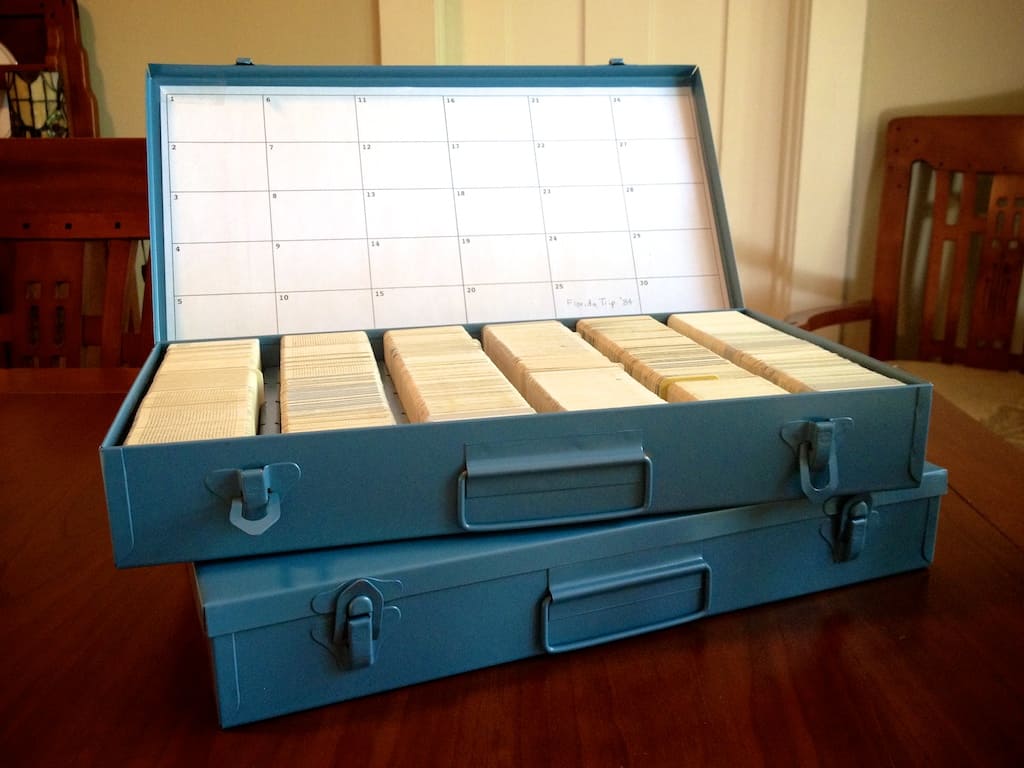
It’s a very nice all-metal box with a hinged lid, two metal clasps to keep it shut and a little handle to carry it by.
I’m Curtis Bisel from Scan Your Entire Life and I bought three of these because I actually couldn’t find what I thought I was looking for, which were these small, little cardboard boxes that hold maybe 70 or so slides that my dad had been using for many, many years to keep his entire slide collection in.
The Logan Slide File is about US$29.95 a piece. When I bought mine they were $26.95 so they’re not cheap. But almost anything slide-related seems to carry a premium right now in the digital era. But from every slide container I found, this seemed to be the best.
I was very happy to read that this slide file box has been made for about 40 years now and for those who like buying US products, you will be happy to know that they’re all made here in the United States in the City of Bartlett, Illinois.
These really are well-crafted. They feel really sturdy, really well-made. My dad still has one of these built by their other company named Smith-Victor and it’s still in great shape.
My dad had just moved so his entire slide collection had just been unburied. Most of them were all stored in those plastic slide projector carousel trays and then those are stored in a big stack of Bankers Boxes.
So this became a perfect project for my dad and I to get together and transfer all these slides. As you start putting slides in, you realize it’s almost easier to hold the ones that you just put in with one hand while you’re transferring new ones in with your other.
If you don’t, they will tend to want to fall over. Logan included a perforated sheet of cardboard that had little dividers you could punch out. You also get a sheet of paper which is divided into 30 squares.
The idea is to write down a description for each group of slides you have in each quadrant that’s defined by all of your dividers. Once you have it all written out, you could easily tape it to the inside of the lid. For my dad and I, it seemed easier just to line up entire rows of slides.
For those looking for airtight containers, know that these corners have small cracks. I really don’t think it’s a huge deal though. I think the main thing to be concerned about is not having light come in and this does a pretty good job and what’s great about these cardboard boxes that they’re shipped in is that for long term storage, they’re the perfect size to fit in standard size Bankers Boxes that you can find at office stores, even the plastic variety.
I read a bunch of reviews before I bought mine and there were a couple of things that stood out that concerned me. A couple of people said they received manufacturing defects in that the slide rails weren’t perfectly even. So they could put slides in one end but as they got to the other end, it became more narrow where they weren’t parallel and they couldn’t even get slides to go in.
Another negative review I read said that even though Logan claims this slide file can hold 750 slides, they weren’t even able to get 500 to fit.
I’m happy to report that in the three slide file boxes that I bought, slides seem to fit perfectly in my rows. I didn’t seem to have any manufacturing defects and as far as the amount of slides I could store, I think Logan’s claim of 750 is probably right on. In fact in this box, without any dividers, I think the count is 813 slides.
Logan does make three other models of this slide file. So if you’re not watching this video on my Scan Your Entire Life website, check out the link at ScanYourEntireLife.com/YT3 for YouTube video three or if you’re watching this on YouTube, click on the link directly underneath the video.
Either way, it will take you to my post that lists all the models, how much they cost retail, their differences and what I think of them and where you can buy all of these models.
All of this will help you choose which slide file will be perfect for you and your collection. I’m actually really happy I never found those little white cardboard boxes.
So I hope that you enjoyed this video. If you just started scanning your collection or if you need help with any of your photos, check out my website at ScanYourEntireLife.com and I would encourage you to sign up for my newsletter.
Take care. Cheers!
[/learn_more]
First, let me point out that I love how in this video, my Dad and I are both drinking a glass of V-8 vegetable juice! Too funny. You can't get much more “father and son” than that — unless we were playing catch in the backyard. (If you missed it, it's at 1:43 into the video)
I was pretty thorough in this almost 5 minute review video, but there were some things I left out because the video was getting too long, that I would like to mention here.
Logan Slide File Model #200
The model I bought and specifically reviewed in this video is the Logan Slide File model #200.
I chose this model because it held the most for its size — 750 2″x2″ 35mm slides, I could have rows without any kind of divider, and it was single layered. (More on that later)
Dividers
My first reaction to the dividers when I picked up a sheet of them was, “Really? The outside is steel but then you make us use cheap cardboard to divide up our slides!? Why not a really nice piece of lightly textured plastic or even a beautifully finished thin piece of wood?”
But, then it occurred to me the reason they went with cardboard was so that you could easily write on the top tabbed part with any type of pen you owned. If they went with plastic, you would for sure need a good permanent marker — like a Sharpie.
But then I put a divider into one of the pre-cut slots in the steel frame and then added a bunch of slides. I quickly realized this might not be the case.

Usually when you think of tabs like these, you would assume they would stick up high enough to be able to write a short bit of information out on them and still be able to read them from above the tops of the slides.
However, I noticed these stick up less than you would expect or even want. Writing would be illegible with my slide collection. Maybe my cardboard mounts are unusually high compared to other varieties.
Possible Placement Problems
There are 6 rows to place slides inside of each Slide File box. Each row has 4 evenly spaced pre-cut slots so that you can drop in up to 24 of their included cardboard dividers.
Because both sides of each divider sticks into the slot ever so slightly, it provides support to keep a set of slides from within from pushing it over. You just might love this freedom to add and subtract dividers as you wish — it's very nice!

But a possible disadvantage for you will be that you are forced into their pre-determined spacing.
This could be a problem if you want to put just a small set of 5-10 slides in for example because they will more than likely just fall over due to the excess amount of space between the two dividers.
I'm not sure what the perfect solution would be to make 100% of people happy. I think possibly having a total of 8-10 slots per row could close the gap a bit. (pun intended)
Make Your Own Dividers
There is certainly nothing that would stop you from making your own dividers if you were handy with a piece of cardboard and scissors.
And you could make yours just a tiny bit higher so that you could easily see your handwriting at the top.
I tried this with an old one-sided business card. I cut it down to 2 ¼ inches high. This was just high enough so I could read the writing at the top but low enough that it appears to clear the lid as it comes down on top.
And the width is narrow enough you can stick it in anywhere in a dense row of slides you would like. The thickness of the business card barely uses up any space, so you have room to stuff the maximum amount of slides in there!

Additional Logan Slide File Models
As I mentioned near the end of the video, the company Logan Electric does offer 4 models of their Slide File line. They are all very similar in craftsmanship and dimensions, but they each carry a couple unique traits that you should probably be aware of if you are thinking about getting one or more for your collection.
And let me just say, it can get confusing if you try and figure out the labeling. So if this becomes important to you along the way, here's some background information so you don't think you've gone insane when you run into this:
Smith-Victor has been making these photo slide boxes for a long time now. In December of 2005, they acquired Logan Electric who also makes photography products. Since then, they have integrated both lines together.
Confusingly, the Slide Files are now labeled on the outside of the boxes as being made by “Logan Electric”, but they are still being displayed on Smith-Victor's website but as Logan Electric products. You won't find Smith-Victor written anywhere on the packaging — at least, I couldn't.
Anyway, here's a chart that quickly summarizes the differences I've found in the Logan Electric line. Below I explain in more detail.
| Logan Slide File Models Available | ||||
|---|---|---|---|---|
| Models | 110 | 200 | 215 | 1500G |
| Image |  |
 |
 |
 |
| Part # | 750504 | 750523 | 750542 | 750561 |
| Slides Held | 300 | 750 | 750 | 1500 |
| Storage Method | All metal individual slots | Movable cardboard dividers | Groups of 25 | Groups in “double decker” design |
| Size | 7 1/2” x 14 1/2” x 2” | 7 1/2” x 14 1/2” x 2” | 7 1/2” x 14 1/2” x 2” | 7 1/2” x 14 1/2” x 4 1/2” |
| Weight | NA | NA | 2.95 lbs. | NA |
| Features consistent across entire line | ||||
| Slide Type | 2″x2″ | 2″x2″ | 2″x2″ | 2″x2″ |
| Color Choice | Blue | Blue | Blue | Blue |
| Material | High grade steel | High grade steel | High grade steel | High grade steel |
| Finish | durable baked enamel | durable baked enamel | durable baked enamel | durable baked enamel |
| Quality | Archival | Archival | Archival | Archival |
| Manufactured | Bartlett, IL USA | Bartlett, IL USA | Bartlett, IL USA | Bartlett, IL USA |
| Cheapest places to buy | ||||
| Est. Retail | $29.99 | $29.99 | $29.99 | $49.99 |
| Amazon | NA | Check Price | Check Price | Check Price |
| B&H Photo | Check Price | Check Price | Check Price | Check Price |
| Adorama | NA | Check Price | Check Price | Check Price |
Differences in Models
 Model #110
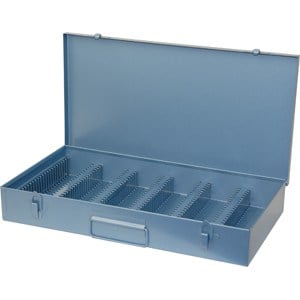
These are the cheapest boxes in the line and therefore hold the least — merely 300 slides. They're great for small collections, especially if you like the idea of having an individual cut out slot for each of your slides.
The downside is you have no official dividers if you want to organize in groups. You could make your own (see above) of course, and stick them in a slot where a slide was intended to go. And since there are no dividers, you won't be receiving the paper insert that included in the other models to mark what events are in your groupings.
I am having a hard time finding the #110 in stock anywhere. It makes me wonder if they are discontinuing this model.
Model #200
 For the same retail price, you can store up to 450 more slides in this model because they have made additional room by removing the individual slide slots. Instead, you are free to place entire rows of slides (touching each other) without any requirement of separation.
If you want any extra separation, they have included 24 punched-out cardboard dividers that you can place in 24 pre-cut out slots along the 6 inner railings to create small groups.
Model #215
 This model is very close to the #200. Instead of having the option of placing 24 individual cardboard dividers into designated slots, you get a thin plastic tray inside that has been divided up for you in 25 groups. (This tray appears to be black in some product photos, but other times a yellow color)
Also, the handle on the outside front is not a metal squared off loop like the #110 and #200. It's a white rubbery (possibly plastic now) carrying handle reminiscent in the “classic” Smith-Victor” line. (In my video, I show my Dad's old Smith-Victor slide box and this has the same handle)
Model #1500G
 For a $20 bump up in price, you can have this model that stores twice as many slides — 1500. I guess that's why they named it the 1500G. (But then why aren't the others called the #300, #750A, and #750B?)
The dimensions of the case is exactly the same as the others, except instead of being 2 inches high, it's 4 ½ inches. This added height allows them to add a separate steel tray inside that comes out. They call this their “Double Decker Slide File.” (These trays appears to be black in some product photos, but other times a yellow color)
It's easy to miss in the photo, but additionally, the front of the case folds down like a flap to make it easier to access the tray inside.
Though I haven't seen one in person to be sure — you can't see in any of the photos I've seen so far — unlike the other models, there is a carrying handle riveted to the outside center on top of the lid. This would seemingly make it convenient to carry around the additional weight more like you would a fisherman's tackle box.
The downside I can only assume, is that would make it difficult to stack more than one of these on top of each other (if that's your intention) and have them lie flat without leaving them in their cardboard shipping container box.
Cheapest Places to Buy
I did a lot of searching around before I bought mine to find reliable places that would ship to my door, and have the lowest prices. Here is that list — I ended up buying from B&H Photo.
Disclaimer: The links in this article are affiliate links. It won't cost you any more money, but if you end up buying through them, I will earn a small commission paid for by the retailer. The best and cheapest places I found these Logan Slide files happen to be companies that offer an affiliate program. These companies are awesome and I order from them regularly.
If you choose to buy through them, please email and let me know. I would love to personally thank you for your gracious support.
Cheers!
| Logan Slide File Models Available | ||||
|---|---|---|---|---|
| Models | 110 | 200 | 215 | 1500G |
| Image | |
|
|
|
| Est. Retail | $29.99 | $29.99 | $29.99 | $49.99 |
| Amazon | NA | Check Price | Check Price | Check Price |
| B&H Photo | Check Price | Check Price | Check Price | Check Price |
| Adorama | NA | Check Price | Check Price | Check Price |

After reading Dave R’s update… I think I’ll just take the slides from their Kodak carousel, scan them, return them, and then put the whole thing back in the original box; no charge. Anyone willing to change my mind on that? (read: are there Con’s to continue to store slides that way?)
I would like to provide an update on the color and price of the Logan Model 200 Slide File.
As of 8/5/2019, the Slide Files that Amazon and Adorama carries are light brown or tan in color. B&H Photo carries the blue color.
As of 8/5/2019, the price of the Slide Files are $59.95 at Adorama and B&H Photo. And the Slide Files are $64.99 at Amazon.
Curtis, thank you for captioning your video, and for noting that it’s captioned. I’m deaf, and have depended on captioning since it started on television in the late ’70s. Those who have lost or are losing their hearing through illness or aging, though, often feel a stigma and don’t use available technology– such as captioned video and television, or the Cap-Tel services which use an operator to listen to the other end of the phone call and type it to you, while you continue to voice for yourself. By making a public note of this at the top of the page, you are are contributing your own little pebble thrown against stigma for deaf and hard of hearing people.
Nancy C.
Aww thank you Nancy! Thank you for taking time out of your day to let me know this. You are the first person to let me know how beneficial this was, so I so happy to know with your comment, there must be others out there as well that have found it useful.
I’ve been paying a transcription service to create a word-for-word transcript, always hoping that it really was going to end up being more useful and accurate to than just letting YouTube do its “robotic” automatic transcription.
Can you tell me Nancy, are all YouTube videos captioned if you want to read the captions? Or, are only some and it’s always up to a video creator like myself to make sure one is provided — either by supplying a transcript or asking Google’s YouTube “bot” to try and create one?
Either way, I’m happy to hear what I’ve done so far is a good step in the right direction for everyone. 🙂
Thanks Nancy!
Hi Curtis,
Good post on the slide storage boxes. Thanks for the info re the Smith-Victor/Logan merger. I was not aware of this, although I’ve had samples of both brands’ products for at least 25 years.
The model #110, with the individual slots for slides, can be a pain to put slides into and remove slides from when you come anywhere near filling a particular row. In theory, it may be archivaly better for the slides since they don’t touch each other and air can circulate around them. However, unless the slides are in glass mounts, there’s a good chance of scratching either or both film surfaces on the corners of the slots if you’re not careful to have each slide perfectly aligned with the slot. Cardboard and thin plastic mounts, especially those without glass, usually fit easily but GEPE, WESS, or other plastic-plus-glass mounts, and some European plastic mounts, may be a little too thick to fit easily or at all.
The cardboard divider tabs you found are likely meant just to support smaller groups of slides within a row and are not intended to have labels like the index label cards in an old-style library card catalog. They are helpful in keeping slides from sliding down parallel to the bottom of the box as you’re putting in or removing large groups of slides. Possibly the reason for the spacing for about 20 slides is that was the number of slides the Kodak Carousel Stack Loader and the old Bell & Howell Slide Cube would handle on their respective projectors. Just don’t get me started on a comparison of these two competitive products as I have very strong opinions about them. Also, films used to come in 20- and 36-exposure rolls before they increased the shorter length to 24-exposures back in the late ’70s or early ’80s. You’d be able to get one roll’s worth of slides into each section of the box, unless you shot 36-exposure rolls. Even then, it wasn’t unusual to get from 37 to 39 shots on a roll if you knew your camera and how to load it carefully before auto-load became common. I’d be upset with myself if I got fewer than 38 shots on a roll of 36 because it meant I’d been sloppy in loading that roll.
The main concern about these dividers or any home-made ones, is the quality of the paper/cardboard used. Is it acid-free and lignin-free or will it eventually cause damage to the slides as it off-gases harmful fumes? Companies like Light Impressions and other archival supply companies do offer archival safe card stock which could be used to make indexed dividers as you’ve suggested.
My guess as to why some of the interior compartments are yellow in some photos and black in others is just a change over the years. Most, if not all, of mine, are yellow and they go back at least 20 years. Probably the black ones are of more recent manufacture. I don’t know what particular material the plastic inserts are made of but I’d hope it’s polypropylene or some other PVC-free material, again for archival storage. This might be a legitimate concern, especially if choosing between the model 200 and model 215 boxes.
Your comment about the handle on top of the lid of some boxes is absolutely right. It’s convenient to carry the box but it does make stacking multiple boxes a pain.
The white handle on the front, as in your photo, is sometimes easier to grasp than the metal handles that fold flat to the front panel but it does not fit as compactly into a given storage space on a shelf since it sticks out so far. If you’re purchasing new boxes that come in cardboard storage/shipping cartons, keep these to store the metal boxes in. If you’ve inherited, or found a batch of slide storage boxes at a yard sale or eBay, try to get cardboard shipping cartons to fit or be prepared to need a little more storage space for the slide boxes.
The labeling may have changed over the years, but the difference in storage capacity used to specify, often in relatively fine print, that the maximum quantity was available only for cardboard or thin plastic slide mounts and was an absolute maximum. If a variety of slide mounts in different thicknesses was included in a box, you might not get anywhere near as many slides in as anticipated. As I recall, they used to specify 300 slides in glass mounts or up to 600 with cardboard or thin plastic mounts.
Hope this helps clarify a few points you’ve made.
Art
Another excellent set of comments you just provided Art.
I can see how you could easily scratch the film part of your slides if you weren’t careful when stocking up the #110. And I am sure you are right with your experience loading a full row. I bet people with small hands really benefit with that last slide!
And, you are so right on about the home-made dividers needing to be made and written on by photo-safe archival quality products. I was so concerned that some people could possibly be unhappy with the cardboard dividers for whatever reason, that I was completely focused on just finding a solution for them. And well, my “creative” solution didn’t have “archival safe” sentiments in mind at all. (I seriously doubt any cheap business cards use photo-safe ink and card stock)
So excellent catch — I’m glad you brought that up! (I think that’s twice now isn’t it?)
Curtis
Hi,
I examined one of my Smith-Victor slide boxes today and noticed the white handle on the front clearly has the S-V logo and name in raised letters. It also has the yellow plastic insert as you’ve mentioned.
At the same time, I checked one of the older #110 boxes with the individual slots and found some paper labels tucked inside it. These are narrow, self-adhesive strips with numbers that presumably are intended to be mounted on ribs between the rows of slides. The adhesive seems to be the old, lick-and-stick type rather than a more modern one with the peel-off wax paper backing to reveal the adhesive. This is of course another potential source of danger from the chemical composition of both the paper and the adhesive, at least in terms of future off-gassing.
One situation I can think of where the #110 style box would be handy is no longer common. Back in the ’70s and ’80s, I was the projectionist for a major camera club’s slide competition judging nights. We’d run through all of the entries once as the judges commented on each photo. Those slides they considered for closer scrutiny went into a #110 box so they were separated from the bulk of the entries but it was easy to select any particular one for review. As they narrowed their choices to a top slide, a runner-up, and up to 10% of the total entries for honorable mentions, those slides went back into the box and the rest went back to their original containers. With the #110 box, it was easy to sort the winners into proper sequence and return them to the chairperson of the competition for safekeeping until the showing at the next club meeting. Of course, with the prevalence of digital images, probably few, if any, camera clubs even accept slides in competitions now. The particular club I mentioned has been confined to digital for several years now so nobody has taken over my job, at least as I experienced it. The only practical use today for a #110 box that comes to mind would be to separate a relatively few slides that one might want to go back and re-scan at a higher resolution and give more careful post-scan processing, if a large collection was being bulk-scanned to simply digitize the collection. Other than that one situation, I feel the potential disadvantages of the type of box are such as to not justify the price and inconvenience of loading/unloading slides.
One point to consider when using the #200 and other boxes is that not too many slides should be crammed into each row, especially if they are in cardboard mounts. These mounts can become easily bent if they are forced into too small a space. It’s possible that the film will also become creased, leaving a non-removable, visible line in the image. Even if the film is not damaged, a bent mount will not lie properly flat on either a dedicated slide scanner (if it even goes in) or on the platen of a flatbed scanner so sharp focus over the entire slide will be difficult to obtain.
An interesting point to consider when choosing archival storage containers for slides is a comparison of these metal boxes versus the polypropylene/polyethylene slide pages that fit into binders. It would be interesting to do a cost-per-slide considering actual (vs. stated) capacity of the boxes at $xx.xx per box for yyy slides and costs per slide for an equal number of slide pages. The physical storage space required for the appropriate number of boxes versus the appropriate number of pages and binders should also be compared. When calculating costs, archival binders should be priced, rather than the cheap PVC binders from the local drug store or office supply store. They are more expensive, but why invest in appropriate pages, just to lose some of the protection by using damaging binders in the interest of saving a little money?
For folks with negatives of various sizes, prints without negatives, and slides of various sizes, the binders and plastic pages might be a more attractive option since the pages are offered in a variety of styles to fit 35 mm negatives, 35 mm slides (or any other slides in 2×2 inch mounts), medium format slides or negatives, and standard print sizes. All of the pages can be inserted into the same kind of binder so a collection of mixed original formats could be stored in one location. This option doesn’t exist in the S-V/Logan slide storage boxes system.
Another benefit of the plastic pages is the ability to see up to 20 slides at a time and even do a ‘contact sheet’ scan of the page on a flatbed scanner. This can be handy for recording information written on the slide mounts. True, it is time-consuming to insert/remove the slides from their pockets on a page but since this would be done usually only once, if one is using your recommendation of scanning once for maximum quality and greatest possible future needs requirements, it shouldn’t be too big a problem. It would also help in making it clear which slides have been scanned and which still need to be done, whether the contents of a page were removed at one time, scanned in batches of 2 or 4, depending on the scanner’s capability, then returned to their pockets or if they were removed 2 or 4 at a time for scanning and then returned.
Art
Art, Art, Art. You crack me up. 🙂 I was SO close to publishing my review post with much of this information. Well, not as detailed of an analysis as one might possibly hope for. Nevertheless, I wanted to cover how I was considering several alternatives to a metal box before they won out.
I already had about a 3/4 of a page typed up about another storage box I had checked into, all the reasons I finally decided against it written out in bullet points etc., and then I was about to start pulling photos of the slide pages when I decided I had lost my mind and I was going too far off topic for a review post for one particular product. So, I copied that over to a draft post that I will save for later.
I finally made the decision that I wanted something to archive my slides in that would be dense and take up the least amount of space as possible. That’s why I went with the Slide File. I do however love the archival pages for my prints — see My Favorite Place to Store My Photographs Forever for anyone who wants to read more about it.
But for the 6,000+ slides I have, I was worried the pages and binders would just take up far too much space. And more than likely, I will be more likely to pull a binder of prints off the shelf than I would would one with smaller, harder to see slides. But, seriously, this is just me. Anyone else reading this should consider their own collection and needs. This is highly subjective.
But, long story short, YES — I think that would make for an interesting comparison and analysis post. 😉
Curtis