
Epson V800 vs V850 — The 5 Differences and Which You Should Buy
So you’re ready to buy a very high-quality flatbed scanner to digitize your analog prints and film. Still, now you're having difficulty deciding between the Epson Perfection V800 Photo and the Epson Perfection V850 Pro Photo Scanners. Don't feel bad. Unless you're already extremely knowledgeable about high-end scanners, let me tell you, it's extremely difficult to understand which model will give you the most benefits and value for your photo collection by just comparing the sales and specifications pages.
Whether you or an avid hobby photographer, a true professional, or just want to get all the quality you can out of your prints and film, either one of these models will give you exceptional results. But I want to help you feel confident you'll make the right choice. Below, in plain English that will make it very easy to understand, I've written out and explained in detail the 5 differences between the two models.
The Epson V850 vs V800 — The 5 Important Differences
Higher Image Quality
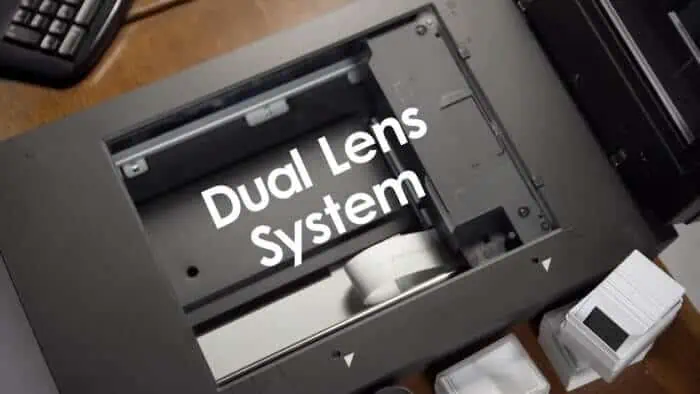
If you've stared at photos of the V800 Photo and the V850 Pro, you've probably noticed they look fairly identical right? This is, in fact, because other than the identifying name written across the top right front of each device, their physical casing is exactly the same for both.
However, inside, it's a little different. Both scanners are equipped with a Dual Lens System — unique to their current lineup's V800 series of scanners. (This system was also available in the V700 series; the V800 series was later replaced) This means when you scan a paper print, the scanner will automatically use a high-resolution lens capable of 4800 dpi (optical). And when you are scanning film in the included film holders, it will then automatically choose a second “super-resolution” lens capable of scanning at 6400 dpi (optical).
You won't find a two-lens setup like this on even the next model down in the lineup — the single-lens-only Epson Perfection V600 Photo. But, with the flagship V850 Pro model, Epson decided to take the image quality one step higher by adding what they call “High Pass Optics.” The purpose of the 850 Pro is to pull out every last possible amount of quality from the scanner using some additional internal design refinements to ensure minimum optical distortion:
- Anti-reflective coatings on the optics
- High-reflection coatings on the mirrors
In an interview with Mark Roslon, Senior Product Manager of Epson America, Inc. states about the V850 Pro:
“The V850 has all of the little extras that we know how to do to make that image quality better. The structure of the two scanners are identical, but the V850 Pro has anti-reflection coatings on the optics, and high-reflection coatings on the mirrors, that simply eek out the last bit of image quality we can get from that system.”
To put it simply, by coating these surfaces in this manner, they can reduce the amount of stray light they don't want getting inside the lenses and increase the amount of light they want bouncing off the mirrors. This means, theoretically, your images will be even more accurate because the scanner has to do less work to process out obscurities unintentionally captured by the lenses.
Faster Scanning Times
Because the case and components of the V800 Photo and V850 Pro are nearly identical, you wouldn't think there would be any speed difference in how long an identical scan would take to complete with either model. However, while continuing to speak about the improved image quality of the V850 Pro, Mark Roslon also adds:
“[The V850 Pro] will also scan a little bit faster because we know the processor understands the data coming in is cleaner, that there is less processing to do to make sure that image is very precise, so we can run it a little bit faster because of it.”
I'm sorry to say I don't have access to both scanners side-by-side to do a speed test with identical settings and photographs. Owning both models would be quite a luxury, wouldn't it! But I've read multiple sources back when these models were released that says the V850 Pro scans 33% faster than the V800 Photo. If anyone finds evidence to back this up or prove otherwise, I would be very interested in hearing from you so I can modify this post and link to the supporting write-up(s).
Additional Film Holders
Both the V800 Photo and V850 Pro come with film holders to make straightening and flattening your film easier while scanning. The difference, however, is that inside the box of the V850 Pro, you will find a surprise.
- The V800 Photo comes with a single set of 4 film holders.
- The V850 Pro comes with not one but exactly two sets of 4 film holders (a total of 8).
The film holders are actually new and improved over those sold with the previous V700 and V750 models. This happened based on customer feedback that the holders should be more rigid this time.

Each set comes with one of each of the following holders:
- 35mm mounted slides — holds 12 frames
- 35mm film strips — holds three strips (up to 18 frames)
- Medium-format strip – holds one frame (up to 6 x 20cm)
- 4-inch x 5-inch frame – holds one frame
Why would you need two sets of film holders?
In real-world film scanning, you're dealing with a workflow like the following:
- Load your film into a film holder
- Wait for the scanner to scan the film in the holder
- Remove the holder from the scanner bed
- Empty the film from the holder
- Start this process over by re-loading more film
If you're not busy dusting off your next batch of film you want to scan or giving your last scanned images specific filenames in your computer, with a second set of film holders, you could save time by filling up a second film holder while the first one is finishing up being scanned. Having an extra set of film holders makes it possible to increase your ability for greater productivity.

Different Scanning Software

It may not be completely apparent by reading the dense “Overview” sales pages of the Epson V800 Photo and V850 Pro, but both of these scanners actually come with two different pieces of scanning software. You are free to use whichever you would like — or even both. First, you get a copy of Epson Scan, an adequate and easy-to-use application made by Epson. It's included with all models of their Perfection Photo scanner lineup. Secondly, you also get a copy of LaserSoft Imaging's SilverFast scanning software. But, depending on which scanner model you buy, there's a slight difference in which version is included:
| Epson V800 Photo | SilverFast SE |
|---|---|
| Epson V850 Pro | SilverFast SE Plus |
At the time I'm finishing up this article, this currently is all you learn from the Overview sales pages on Epson's website. One is SilverFast SE, and the other is SilverFast SE Plus. But what are their differences? Do you really need SE Plus, or will SE be adequate for your scanning needs? For those unfamiliar with SilverFast, here's all the information I've compiled for you to help you make an easier purchasing decision.
SilverFast SE vs SilverFast SE Plus (The Differences)
If you don't include their SilverFast software written to control very specialized high-end scanners — such as Heidelberg drum scanners and medical x-ray film scanners — there are basically three versions of their scanning software SilverFast you need to know about. In order of features included, they are SilverFast SE, SilverFast SE Plus, and then their highest version is SilverFast Ai Studio. All three are calibrated to work well with the Epson V800 series of scanners.

SilverFast SE
Comes with V800 Photo (Retail Price USD $49 — if bought separately)
- SE is their “entry level” scanning software for “uncomplicated and professional scanning specifically designed for beginners.”

SilverFast SE Plus
Comes with V850 Pro (Retail Price USD $119 — if bought separately)
- All of the features included with SilverFast SE.
- Also includes the following important functionality for advanced users:
| Multi-Exposure | Increases the scanner's Dynamic Range, removes image noise and captures more details especially in dark areas of the image. “SilverFast Multi-Exposure records an original's maximum Dynamic Range by performing a double scan with an increased exposure time of the second scan. This procedure captures the light image area's details in the first pass and the shadow details in the second. Afterwards an algorithm calculates the final scan, which now contains any detail, from each single scan.” |
|---|---|
| Kodochrome Features | Scanning Kodochrome slides can be challenging and often leaves them with a bluish tint. “By implementing improved Kodachrome routines, it's finally possible to achieve high-quality scans of Kodachrome slides with the highest possible Dynamic Range, color calibrated and free of bluecast, dust and scratches.” |
| Auto Frame Alignment | Works in unison with the “Automatic Frame Detection” feature (Also available in ‘SilverFast SE' to “align the frames in a rectangular order with a single mouse click.”
|

Printer Calibration (Sold Separately) Includes the ability to use LaserSoft's Printer Calibration software with SilverFast (Optional – software sold separately). “Output or printer calibration is very useful when the task is to reproduce an image via printer under the condition of keeping the colors and hues as original and predictable as possible. Without creating an appropriate ICC profile that takes into account the printer, ink cartridges, and paper used, the task is almost impossible. The SilverFast 8 Printer Calibration is an exclusive feature for calibrating the printer using a flatbed scanner, which is appropriate for professionals and beginners due to its easy handling and smart price-performance ratio.” (Printer Calibration only works with the SilverFast SE Plus and SilverFast Ai Studio versions)
Included Scanner Calibration Software
Finally, the last difference with the V850 Pro is you will get the “X-Rite i1Scanner with reflective/transparent IT8 targets.” The Epson product listing makes it sound like you are getting a separate hardware scanning device. But, you are actually getting another piece of software called “X-Rite i1Scanner” and IT8 targets that work with it. These two go hand-in-hand to calibrate your scanner for color accuracy. The process has you scan the flat IT8 target with your V800 series scanner. The i1Scanner software then analyzes this scanned file and compares it to a reference file associated with your color target. The difference between the two is mapped into a “color profile” that is assigned to you that you can now use with your scanning software. The i1Scanner software will work with the Epson V800 Photo if you were wondering. it just isn't included with the purchase of one.
Final Thoughts
If you were at all confused before about how the Epson V800 Photo and V850 Pro are different, I certainly hope I was able to clear things up for you. If you still have questions, let me know in the comments below.


Thank you so much for the article. It helped me to expand my knowledge.
The film holders are adequate but not the best in my opinion. Do you know by any chance if anyone makes aftermarket film holders?
Again thank you for your information
Nando from New England
They aren’t cheap, but I’m a big fan of the Lomography DigitaLIZA masks. I have 2 each for 35mm and for 120 so I can load one while the other is scanning. By far the quickest and most consistent process I’ve tried
https://shop.lomography.com/us/digitaliza-120-scanning-mask
https://shop.lomography.com/us/digitaliza-35-mm-scanning-mask
Thanks for the information
I am selling my Epson 800 and now doing digital camera scanning.
why ?
Hi Curtis
Excellent explanation about what esch model offers and their capabilities.
Thank you very much!
I want to be able to scan 8×10 B&W film on the V850 scanner. There is no holder for this. Can I scan directly on the glass glass? If not, how do I get the sharpest possible scan from 8×10 film?
Can I scan 35mm film strips of 6 frames on the glass, without putting them in the holder? Is the scanning area large enough to take 6 or 7 of these film strips? Can the focus plane be adjusted to scan negatives like this, rather than putting them in the film holders?
You can scan with V700 negative holders which hold 6 strips of 6 negs.
Hi, I could certainly use someones help with an issue. Just setup my new V850 today on a powerful Windows 10 Enterprise PC desktop. Downloaded and installed the latest Epson software, used the same settings in EpsonScan that are on my (still in use) V800 connected to a 15 year old Windows XP laptop. It takes approx 45 seconds to scan two 35mm slides on the 800 (@2400 DPI) BUT… takes 1min 45 seconds on the 850. More than twice as long. I would have expected the opposite. I have tested with both for about 2 hours with the same results. Epson tech support has no answers for me. Any suggestions?
Hi! Did you ever figure this out? Which scanner do you like better now that you have used both?
Are you using the same resolution scan? Check to see that the resolution is not just set to Auto. Also note that the high resolutions are different.
Hi Curtis,
I am an artist and I am interested in buying an Epson scanner to be able to digitise my artwork for big high quality prints and for digital products (e.g. huge watercolour textures for graphic design needs). I am considering V600 and V850.
I already have an old scanner and a mirrorless camera with macro lens and I use it for bigger work, heavily textured work and works that have gold reflective elements. I need to upgrade my old CanoScan lide 600F scanner for the best possible scanner out there that I would be happy with for years.
The main purpose – to be able to scan my smaller works/studies on a slightly deformed waterolour paper to have that option for a quicker workflow (instead of setting up my camera, lighting, and positioning artworks). I need to scan my artwork at 1200dpi as I would like to have the ability to print big. My work is watercolours and sometimes shiny acrylics.
I am wondering the following:
1. My main concern is – will any of these scanners be able to scan works on wavy slightly deformed watecolour paper? I’ve been using CanoScan lide 600F and I often get blurred parts where the paper is impossible to press down perfectly. I believe it is the restriction of CIS sensor. So my question is will the V600 and V850 models with CCD sensor work for that purpose better?
2. Is it possible to determine if the texture of watercolour paper will appear on a scan? I’ve heard from an artist that there is this option to scan or to not scan the texture in V600 (if I am not mistaken), is it correct? What about V850?
3. Is it possible to scan much bigger artworks on stretched canvases with these scanners? Are lids removable? Would the scan be in focus even if the painting is not touching the glass? (There are borders around the glass meaning that big artwork on stretched canvas can’t be pressed down). I’ve heard people are able to scan up to 18” x 24” using V600, but I couldn’t find precise info (whether a lid was removed and whether a painting was pressed down or if it was on a stretched canvas).
5. Which scanner would produce more accurate colours of the originals? And which scanning software would be best for my purpose in this case? I also use Photoshop/Lightroom for colour correcting, but if scanning software would make it quicker, that would be nice.
I would be so happy if you could answer to these questions and help me to decide on the best option for me. Would V600 be enough or should I go for V850?
Thank you so much in advance if you will have time to answer!
Here is example of a print: https://www.eclosque.com/prints/effuse-abstract-fine-art-print
And here is an example of one of my textures pack: https://www.eclosque.com/digital/heartful-watercolour-textures
Hi Anastasia! Did you ever get one of these scanners and did it work out for you? Love your work. I want to scan photographs but there is a few artwork pieces of my daughters that I would like to digitize.
Hi Roxanne! Thank you for your kind words. Yes, I’ve got V600 and I’m very happy with it! I can scan slightly wavy works, I can either scan with or without paper texture and I also found a way to remove the scanner lid to be able to scan big canvas! (It’s not very easy and official ha, but totally doable). It picks up details wonderfully and much better than my old scanner (which was great for me too until I tried V600). I hope that helps!
what do you do to remove the paper texture? i have an v550
Hi. I have been using an Epson V850 pro scanner for some years now, and was able to get really good quality hi-res scans using the Epson Scan software. I have since upgraded my OS software to macOS Catalina – 10.15.7 – and can now ONLY run Epson Scan 2 software – which in my view is absolute rubbish as after several days of trying to get it to achieve what I want, I simply cannot!! Any thoughts, hints or tips in this regard – or recommendations on scanning software for my set-up?
Hi Curtis
Really helpful article – many thanks.
I’m currently scanning photo slides via the V800 photo and am about to embark on a major project of scanning up to 20,000 colour slides many to be used for publication in a book. Some of the photos will be around A3 size. What settings do you recommend for these scans. I have been scanning at 400dpi and 1750% creating image size of approx 150 MB. Is this good enough for professional publication of large photos. We’re also wanting to create much larger photos at a later date – are you able to recommend a suitable setting for dpi and size?
Finally, should I purchase the V850 pro to improve the quality of my scans?
Many thanks
Kevin Williams
You should be using a film scanner. because you have so many slides. See if you can get a used Nikon scanner (the 5000 is better than the 4000) with an automatic slide feeder. They do at least 36 at a time. So you can walk away from it. Minolta was the best slide scanner however they were tricky. So only get one that you can return if it does not work. If you can find an Imacon , it is THE BEST but very pricy. (if you use one, look into wet scanning from ScanScience in Canada. The epson also ha a way to do wet scanning. Imacon is also a bit tricky to work with and slower to load than using a nikon with bulk feeder. Scan them at the largest size you can and at 16 bit. The nikons do 4000 dpi and the minolta about 20% larger. Both have a scratch and dust removal feature, which is great. I used it at the lowest level. if you slides are untouched, then you don’t nee this, but most likely you will need it. Do a test at the larges size scan and then look carefully at it in photoshop or other app to see how much retouching it will need. when you scan with any scanner, Use only a maximum size equal to the native scanning capability. specs are often given with two values 800 / 1600 dpi. Use the lower one. The upper one means it is interpolated to be larger. you can do this in photoshop IF you need it. If not, then no reason to degrade the original scan by making it larger.
The Epson scanners only have a resolution of 2300 for 35mm (about 6.7MP). So, if you set the scans higher you only get large bloated files with no extra detail (as the optical lenses are the real limitation, not the electronics, so the scans look somewhat out of focus on an HD monitor). Manufacturer specs tend to boast about the high CCD resolution and hide the low optical resolution (very misleading).
Moderately priced film scanners are available that will do 4100-4300 (about 23-24MP, sufficient to resolve grain and dye clusters and display crisply on a 4K UHD TV or quite well with some scaling on an 8K UHD TV).
Pacific Image (aka. Reflecta in Europe) have a variety of models with varying degrees of automation (manual is the cheapest). They seem to give good results (search for brand/model on Flickr to see examples), but there are reports of poor build quality (may not be long lived and reliable).
But market choices are now very limited. Nikon quit in 2009 and running a secondhand Coolscan will likely require the software driver and software to be installed in a virtual machine due to incompatibilities with modern OS. They are very expensive compared to the modern units when found new (up to 10x the price), have slightly less resolution but better shadow detail retrieval (and are solidly built). I suspect even a secondhand unit will cost significantly more than a modern alternative.
Some informative reviews and comparisons are posted on filmscanner(dot)info. The site is a bit eccentric: awkward dense wordy phrasing; no mention of supported colour gamut (no reviews or scanner spec sheets ever mention this very important specification, and some scanners are locked to sRGB which is significantly less colour range than film, modern monitors and TVs); sample scans are displayed as tiny 256 colour GIF files, etc. But still, a good start on getting a handle on what’s available.
I think another noteworthy part of your site is the WAY you answer people’s comments. Your answers are so friendly, validating, and respectful. Even though that has nothing to do with pictures, it is something worth noticing. I just wanted to add that.
Hi Curtis,
Thank you for your wonderful site!!!!!!!!!! It really speaks to us of the perfectionist variety who are trying to figure out what is “good enough!”
After procrastinating for a while, I am energized to embark on my photo scanning project. I’ll be scanning old family photos to preserve and share with the family. I have a few questions that I hope you can answer to help me move forward.
1) Being that I don’t need to scan negatives, and being that I’ll probably be doing 1200 dpi as your recommend, do I really need the V850 or would the V39 suffice, and why?
2) Elsewhere, you advise that it’s always better to scan higher, as you can always shrink the photo afterwards. I wonder- what is the difference between a photo that was “scanned higher and then made smaller” and a photo that was “scanned lower to begin with?” For example, if the higher-scanned photo got to much of the paper’s grain, would shrinking the photo undo (fix) that, or would the shrunken photo still be worse off than the photo that was scanned lower to begin with? Or in other words- can you ever be worse off scanning higher?
3) Are there any scan features that are a “must know” before scanning, or can I just scan “auto” and then have the peace of mind that should I want to improve the photos in the future, a photoshop expert would be able to do so manually? For example, coloring, scratches, dust, etc. I am trying to do the least work now but still be future-proof in that regard.
These are the questions that are keeping me from starting. I am looking forward to hearing from you!
Many, many thanks!!!!! Sarah
Hi Curtis,
Great artical. Thank you. I am a graphics professional and just learned that a set of replacement bulbs for my 20 year old 40 grand Screen Cezanne scanner are going to cost me $1,900. Do you think the 850 will give me professional results? The Cezanne comes darn close to drum scans and maybe be better for a CCD scanner. I will be scanning mostly 35mm. I’ve had very poor results on Epson’s lower end scanners. Thanks, Jon
Hi, I am about to undertake the huge job of digitalizing a massive amount of famiy photos, and reading this is very helpful. A couple of questions: how about the high speed scanners like the FastFoto FF-680W Wireless High-speed Photo and Document Scanning System? Any experience with those? Also, is there a resale market for these? If I invest in a more expensive model, would I be able to sell it after about a year and recoup some of the cost? Any ideas where I could look for a used one now? No luck on Ebay or a google search. Many thanks, Curtis and all.
Does anyone know where I can buy a used V850 scanner? I have a couple of thousand slides to scan in. I’m located in Canada.
Tricera 604 733 5702 experts in high end scanners and printers from epson
Does the 850 come with an internal hard drive? I’d like to take it with me to scan photographs that people may not want to part with from their homes?
It does not, Greg. The Epson V850 Pro can’t work independently. It’s strictly a flatbed scanner that cannot work unless it’s connected to a computer with either internal storage or external storage also connected.
If you are looking for something portable and independent from a computer, consider something like the Flip-Pal. There are a lot of quality/software compromises when stepping down this far compared to the highest-end flatbed like the V850, but you will at least be extremely portable.
I am a plant biologist and would like to scan plant materials like, roots to produce negative images that to be fed by WinRHIZO root analysis software. I had experience to use v800 but the scanning time is pretty slow. Can anyone tell me which would be better for generating images of plant materials (living or dead)? Also want to know where to get the transparent plastic trays for spreading roots in water and then scan? Thanks in advance.
We recently purchased the Epson V600 to do home scanning of old photos, negatives and slides. It came with two negative/slide trays for standard sizes. We have come across old negatives approximately 3″x 5″ in size. Do you know if it is possible to purchase additional film holders that would accommodate the larger sizes? I can’t find anything on the Epson site about it, nor a way to get to customer service that is not automated and doesn’t read my questions correctly. Or is it possible to scan them and convert to positives without a holder? Serious novice here.
amazon sells replacement holders for the v600
I am looking to buy a scanner for home use – 35mm neg, slides and photos. Epson V850 pro looks the most advanced but I think is over 5 years old. Does anyone know if Epson will be introducing a newer updated model, or cheaper model with similar functionality?
I’ve read and heard nothing to make me believe a new model is coming out anytime soon.
Check out this comment thread started by “Peter” and my answer here on this same article.
You never mentioned ‘Digital ICE’. What version does each use?
Hi Curtis, thank you very much. You gave me exactly the information I was looking for. I have a v700 since it was released and I am very satisfied with it. But unfortunately I have the FireWire-version. It works perfectly with my early 2008 iMac, but after nearly 12 years the Mac needs to be replaced by an actual 27″ Retina model. I guess FireWire will not work with this, not even with an adapter. So I will probably sell the scanner and the mac and have the v850 instead. Regards from Germany
Very informative article and very useful.
The questions I have deal with the different sizes of photos to be scanned.
My mother and her mother were both camera/photo enthusiasts. I have pictures from the early 1900s with various exposure issues. Now I am aware that you cannot fix exposure issues, the data you have is what is there. The sizes of the various photos are from the old ‘wallet’ size to larger sizes which were done by a professional and these are on a heavy cardboard backing.
I have scanned some pics on a scanner I have access to and of course the scanned image is the size of a full 8 1/2 x 11 page. I don’t have a way of cropping out the empty space, word will crop it but the entire file is cropped meaning the size of the photo decreases with the cropping.
I am trying to find a way to scan the various sizes of photos into files which do not include a lot of empty space; or software that will allow me to crop individual photos or separate photos should I scan several together.
This may exist, I simply am not aware of the fact either way.
I have just started this project, I have several old photo journals, a lot of loose photos and a lot of old slides I could copy.
The main thrust of this comment is to find out about separating multiple photos in one scan and scanning only the photo rather than the entire scanning bed.
Software I know nothing about now. I know a lot of magic can be done by the adept but have no idea which program would be useful to me.
I see the last post here was several months ago, I am hoping this is still a live discussion.
The Epson V600 flatbed will handle up to 4 slides in a batch and two strips of 35 mm negatives, or several medium format slides or negatives, as well as reflective materials (prints) up to 8.5×11″. The much more expensive V800 & V850 will also do the same size reflective originals, but will do more slides or negatives in a batch. They will also do transparent originals up to 8×10 inches. The EpsonScan software included with all Epson scanners lets you crop to scan just the image you want, without extra space. VueScan Pro (VSP), less than $100 USD from Hamrick Software, works with thousands of different scanners. It also lets you crop and scan multiple individual images, regardless of whether they’re prints, slides, or negatives. I’ve consistently found VSP to cut my scanning time almost in half for scanning the same originals while giving me many more scanning options. It’s well worth the investment. Be aware that the less expensive VueScan program does NOT work for slides or negatives, so don’t bother with it when you want to scan slides. Check out the VueScan User Guide at https://www.hamrick.com/vuescan/html/vuesc.htm to learn how to use the software. It’s very informative.
VueScan works well with negatives. Moreover, it works well with numerous scanners, both new and old. I use VueScan for both my Epson v750 Pro and an old Epson tabloid scanner. The VueScan interface is complex, and the learning curve can be long. However, the software is flexible and once purchased it works with a huge number of scanners from various brands. If you have good skills in Photoshop and if your scanner’s own driver will save large 16-bit per channel TIFF files, I think there is little reason to buy custom scanning software. But, being able to use the same VueScan interface for multiple scanners can be a big plus for some.
Exactly. I use multiple scanners for different purposes at the same time and love having a single interface to contend with.
100% agree on the VueScan Pro, which comes with a lifetime upgrade policy, or at least did when I bought it over a decade ago. I’ve relied on it to hook up numerous scanners that were no longer supported with great results. Works flawlessly with all of the Epsons mentioned in the article for both Windows and Mac platforms.
THANK YOU SO VERY MUCH CURTIS! I have looked everywhere to find this quality and breadth of info about these 2 scanners, specifically the differences between them. I will read over this a few more times, I am sure, but I know now the answer to which to buy is here for me. It is so damn difficult to buy a scanner or a printer these days. Thanks in particular for the software comnparisons – impossible to find ANYWHERE. I can’t tell you how much I value those comparos! I’m more a prosumer than a professional – I do like to know my specs and what they can/can’t do for me BUT I definitely do not know it all. Reviews are scant on detail (like the detail in this article) and with both scanners and printers you never know if you will like it until you start using it. Therefore, detailed articles like yours are worth gold bricks in saving time and costly mistakes. However, I’ve had Epson scanners previously (4990 Photo – absolutely wonderful but killed by lightning sadly!) and currently get by with a little V39. The tiny V39 is great as a standby (very slim and cute and reliable as it is an Epson) and does a good job on office stuff but leaves a lot to be desired on photos. It was only $90AUD though! Great value! Again Curtis, THANK YOU as the info you have supplied here is GOLD and near impossible to find elsewhere. Thanks mate, – Brian in Sydney Australia.
Hi Brian, can you please explain how the V39 “leaves a lot to be desired on photos?” I am about to embark on a photo scanning project of our late grandparents’ photos and I had been planning on using it. Thank you.
If you don’t mind, I’ll offer my two cents worth. The V39 dmax pales in comparison to the V800/V850, and even the V600. To get solid true black, you’ll be torquing up the contrast to the point that you may lose detail in other ranges. The most important thing for scanners is not the speed, nor even the color in many cases. It’s the ability to maintain the maximum amount of usable detail in the highlight and shadow areas … preferably at the same time.
Hi Alberto,
Have you tried contacting Epson Technical Support? It’s probably not a good idea to try to change the glass yourself in case some other part or parts of the scanner get damaged. Epson should be able to advise you of an authorized repair depot in your area or tell you some alternative, such as shipping it to their office for repair.
Hello,i have the Epson V750 and the problem is the glass, it has some scratches, and this is pain you know where specially when working with negatives, where can i change the glass here in Miami Florida? also can you use the film holders from V850 in V750 PRO?
The V750 holders work on the V850 so I expect the newer ones would work on the V750.
No Sir, the holders are not interchangeable between the V700 and V800 series. The new holders are redesigned – and considerably better.
(Mark Segal: Author: https://www.silverfast.com/downloads/92ed080ac1ae274ea6aeed756a504f7a/en.html ; Scanning Workflows with SilverFast 8….”
Hi, I use v850 holders with my v750, and they are working perfectly!
If looking for the best scanner for artwork (paper prints not film or negatives) can one tap into the capabilities of the “super resolution” lens capable of scanning at 6400 dpi (optical)? I’m looking for the best option for artwork and don’t want to over pay for features I won’t be using. What are your thoughts?
Hi Julia,
The Epson V8xx series scanners, I believe, will scan a maximum of just over 8.5 x 11.7 inches at one time. If your artwork is larger than that, you’d need to do each piece in two or more sections and later splice them together in software. You also probably don’t have a computer capable of handling the humongous files you’d get from scanning anything letter-size or larger at 6400 dpi. A 4″ x 6″ print at 6400 dpi would give you a file of (4×6400) by (6×6400) pixels (25,600 x 38,400 pixels) or about 983.4 megabytes. Your scanning time per image will likely be measured in minutes, as will the time it takes your computer to load such a huge file into any image editing program. Storage will also be an issue for just a few images of that size.
How large do you contemplate printing any of your digital images? Remember that the larger a display image, the further away the viewer needs to be to be able to view the entire image. Even highway billboards are printed at 300 dpi or less, although they appear acceptably sharp at normal viewing distances.
You’re likely to have difficulty finding any scanner with a larger platen than legal size (8.5 x 14″) at any price with anywhere near 6400 dpi. Even if you did find one, do you have sufficient space to set it up and a table/desk strong enough to support its weight?
You might check with nearby art galleries or museums to see how they digitize their artwork.
To digitize artwork of any size larger than 8.5 x 11″, you’re probably better to use a digital camera with a macro lens that lets you shoot in RAW. You could then take a shot of the entire piece of artwork and take additional shots by moving in and shooting smaller parts of the image to enlarge significant detail areas. You’d get about the same, or better resolution, depending on the capability of the camera, with much smaller file sizes, and in fractions of a second per shot. My Sony A-77 Mark 2 has an image sensor of 4,000 x 6,000 pixels and gives me ARW (Sony’s version of RAW) files of about 25 megabytes. Cameras with higher resolution sensors, common in newer models, would give correspondingly higher image resolutions, but still nothing like the 6400 dpi from scanning.
Hi Julia, at 6400 dpi the file sizes may become too large even if your computer can manage them. Photoshop has limits as well, as do many storage devices that limit the size for individual files.
As Art mentioned, a 4″ x 6″ at 6400 dpi would be almost 1 gigabyte. A common 8 x 10 would be over 3 gigabytes! Photoshop duplicates the file numerous times in virtual ram to allow for layers, history levels, etc. You’re quickly into a high end processor / RAM combo just to do light editing on your files.
Here’s an example of mine that might work for you as a fellow visual artist and perhaps clarify your dpi needs. I scan drawings on an old Epson A3-size flatbed scanner at 1200 dpi in Vuescan. An A3 drawing page, for example, is 11.75 x 16.5 inches. The scanned image is 14,100 x 19,800 pixels. That’s about a 300mb file, but it gets worse. That same file will consume over 1gb when loaded in Photoshop because the system allots extra memory for history and levels. Nevertheless, it is usable once loaded, and in Photoshop or other image processing software you can convert without resampling that 1,200 dpi file down to 300 dpi (the latter is adequate for printing on most textured “fine art” substrates) and your A3 original will print at a very impressive 47 x 66 inches, too large for the 44″ inch printers on the market! I knock mine back to 40″ to print on an Epson 44″ printer. That 1200 dpi scan is usually plenty for most artwork and much easier to work with than higher res scans.
In other words, you will definitely encounter limitations when working with 3 gigabyte files if you decide to scan A4 or letter-size artwork at the full 6400 dpi, or even the 4800dpi. Even on a very fast computer with 16gb or even 32Gb of Ram and gobs of virtual ram space on your disk drive, most Photoshop tools, rendering, filtering, etc will be very sluggish … if the file even loads. If the original artwork is much smaller, then yes there may be times when you will want the added resolution if you plan to print huge.
Hi,
I’m a bit confused with the loading of the 850 tray.
If one follows precisely what the manual says, they tell you to have shiny side up when you load.
If you look at online tutorials other scanners 700 or 800 they’ll say the opposite.
Any clarifications ? Has the loading of the 850 changed after the 700 ?
I seem to have the images scanned in the way they were shot if I follow the manual , however all the online tutorials say the opposite..
Best
Hi Amali,
Regardless of what the manual or online sources may say, so long as your negatives scan so that any printing in an image appears the right way to be read, continue putting your negatives into the holder as you’ve been doing. The “shiny side” is the “base side” of the film which holds the emulsion layers that give the colors. With slides, the “shiny side” goes toward the screen and the “base side” goes toward the projector lamp. If your scans have any text in the image appearing as a mirror image, or men’s shirt buttons are on the man’s left side (viewer’s right), you should flip the strip of negatives the other side up since it’s upside down.
https://epson.com/Support/Scanners/Perfection-Series/Epson-Perfection-V850-Pro/s/SPT_B11B224201?review-filter=macOS+10.14.x
Have you tried this?
Thanks for the clear and detailed information! You’ve cut through a lot of online searching and comparing, and made my decision so much easier. (The 800 will be quite ok for me). It’s genuine people like you who make a difference.
Sounds to me that Apple is mostly to blame – who can keep up them? If an operating system works, why can’t they let it be? We all have to keep changing our systems and our software to suit Apple.
Nope Paul, I wasn’t provided a free scanner to complete this article. As much as I have been promoting Epson scanners over the years, at this point, Epson still hasn’t been reached (back) out to me to provide me with test units for any my articles or my Membership training videos.
I’m really sorry to hear you are having issues with your scanner. Hopefully they take will take your correspondence seriously and reach out to you and help you solve your issues. Their macOS 10.4 Mojave page does say they are in fact trying to keep models in their lineup compatible. Typing in the V8xx series and V600 product line does being up driver support on the subsequent pages. But, I’m guessing from what you wrote, the issue you are having is more specific to the models not working in a “Wi-LAN or LAN” environment correct?
If you use VueScan Pro, generally superior to EpsonScan anyway, any Epson or other brand of scanner will work with virtually any version of MacOS or any version of Windows. Just be sure to buy the Mac version of VueScan Pro. Visit http://www.hamrick.com to view the list of supported scanners and operating systems supported by VSP. Registered users of VSP get free updates for life, with new versions released usually every couple of weeks to be compatible with new OS updates and to correct reported bugs.
Great article. I have a question about the coating of the 850 Pro. If I were wanting to scan using a wet mount process, would the wet mount solution degrade the coating? Is this coating on the scanner bed glass itself?
Thanks Sam. 🙂
If you’re speaking of the unique coatings on the V850 Pro that I mentioned in #1 of the article, those coatings are actually on the optics (lenses) and mirrors inside of the scanner, underneath the scanner glass. If you also purchased the optional Epson Fluid Mount Accessory would be loaded with your film, sandwiched inside with fluid, and then this whole mount would then be placed on top of the scanner glass — as shown here in diagrams on one of Epson’s support pages.
Very useful article, but I have a question.
I got an Epson v750 a while back and I’m ready to get busy scanning my collection of ~2,000 slides.
Would there be any major advantage to selling my v750 and getting a v850? I.e., any must-have features that I should consider?
(I can’t believe they didn’t change to USB 3 on the 850).
Hi Jim, I’ve scanned in almost 50,000 family slides and negatives using the V750 Pro. I think the main benefit to the 850 is the led light and hence faster startup time. I’m sure you’re aware that the V750 will go to sleep and then need to warm up again before it starts scanning. Also, you can use a firewire instead of USB 2.0. Might help a little bit. Anyway….if you can get a good price for your 750 it might be worth it….but if you can stick to scanning fast enough that the scanner doesn’t go to sleep then I think you’ll be fine with the 750.
I read from several reviewers on Amazon that the i1 Calibration software is no longer supported and cannot be registered. Epson cancelled their business relationship with X-Rite. Can you confirm?
Epson V900 & V950 – Any news or info would be much appreciated.
Hi Peter, I haven’t heard anything regarding Epson producing a v900 or v950 scanner. There was some rumor mill in Australia about a launch there, but that was 2 years ago. Epson doesn’t have any such mentiojn on their site or in their launch material. They do have the 9000 printer.
Peter, I spoke with a representative from Epson in person a month ago, about many different things. One thing I recall him bringing up in our conversation was the V800 and V850 were really only released to bring parity across the rest of their scanner line, to include an LED lamp. Additionally, he said they also wanted to address the concerns many had with the film trays, and update their design to meet user requests.
So, given the amount of time it took them to update the V7xx series to the V8xx series, and from the things the representative told me, I think it’s a fair assumption Epson doesn’t view their Perfection flatbed scanner line like Apple views their iPhone “cash cow.” I think they are quite proud of their V8xx series as is, and likely has no intention of updating the two models anytime soon.
I ran across your review before and book marked it as I’m going with the 850; far too many old negatives. Many are my dads from the Korean & Vietnam wars. He has some absolutely incredible slides of Debbie Reynolds in 1956 as my dad was the military liaison for her when she was touring Korea. I think these Epsons are truly the best. I’m in Law Enforcement and deal with Biometrics. I use the 700 in my department for latent print scanning of hard print cards; immaculate and they meet the FBI standards. I look forward to working with the 850.
Thanks for your review as it made the choice for me.
Zak
Oh cool Zak. It sounds like you have a great collection to work with — Thanks for sharing!
And glad to hear my review helped you, and that you are going with the 850. I’m sure many will be jealous! 😉
Hi Curtis – will the V800 scan View-Master reels? I have hundreds of View-Master Reels and slides that I need to digitize. Thank you!
Hi Andrea,
You should be able to manually scan your View-Master reels on the V800. Use which ever slide/negative holder will fit their outer diameter (probably the 4×5 but possibly the 5×7), and lay a reel on the glass. You may need to use popsicle or similar thin sticks under the outer edges of the reel to keep it level and parallel to the glass. After doing a Preview scan, simply crop in to fill the scan with a single frame image. If your software lets you scan a batch of images in sequence, turn on that feature and crop as many images per reel as you can for each batch. Once you’re happy with the crop(s), go ahead and do the scan. No doubt it will be a lengthy, time-consuming process, but it should get the job done. It’s unlikely Epson or any other company will produce a commercial holder for View-Master reels, since probably few people who still have any will be interested in digitizing them. A couple of years ago, I did find an individual on the Web who used a 3-D printer to make custom-sized slide holders for the V600 so people could scan 126 Instamatic and 110 Pocket Instamatic, and possibly also Kodak Disc negatives, but you’d need to google for his name and web site. If he’s still offering such services, he may be willing and able to help you with an appropriate holder. Good luck in your project.
Hi Curtis…. Firstly let me say how delighted I was to find your site! I can see from the past couple of days of reading that the info here is going to be invaluable going forward with my project. After weighing up the options, I pulled the trigger this afternoon on the V800! It really came down to a choice between that and the V600. Despite the fact that I currently only have maybe a few hundred slides and the same number of negatives, the preponderance of what I will be scanning will be prints. Somewhat inexplicably, my parents, who have some 60 albums full of prints, all neatly labelled with dates and characters in the pictures themselves, appear to have thrown out ALL the negatives. Now given that my father was a librarian, and threw literally nothing away in his entire life, this has come as something of a shock! So, on the basis that the negatives might one day appear in some long forgotten nook or cranny, or suitcase, or trunk, or once word gets out about what I am doing, and another relative rocks up with a few thousand slides or rolls of film… I decided that the thought of being able to only scan 4 slides or two strips of film at a time would drive me to despair. I am endlessly impressed by the amount of effort some of you guys have put in!
Similarly I have dismissed the idea of camera scanning… I just know that if I went down that route, not only would I wind up spending vastly more money on the equipment (because I am a sucker for “buy the best you can afford” which has always served me well), but also the job wouldn’t get done! The convenience of having a single (admittedly quite large) box on my desk, that I can just lift the lid and pop a print or two when I have a spare minute or twenty far outweighs having to set up a camera, Lightbox, lights etc, let alone keeping all that clean and dust-free! My work space tends toward that of Steven Seelig, rather than that of Mark Wentworth! I just know that simplicity is the key for me, I spend most of my day sitting at my iMac, so hopefully the extra effort of popping on some pics will be relatively simple. And certainly no worse than having to deal with iTunes (I am now reloading in my collection of approx 3000 cd’s, but apparently Apple can only find the artwork for approximately half of them! Resulting in time spent finding an image and pasting it into iTunes- approximately 11 mouse clicks per image!).One way or another I will develop Repetitive Strain Injury haha!
Anyway, now I need to study the rest of this site to make sure I get the labelling right… and the thorny issue of captions… and whether I need a dedicated program like photoshop? I definitely don’t want to go down the adobe route of having to subscribe for something I might not use on a regular basis…
I’ll endeavour to post my progress… Thanks again for all your insights and hard work!
Regards from the UK
Andrew
Hi Andrew,
I share your sentiments about needing to subscribe to any program, such as those from Adobe. A good alternative to Adobe’s Lightroom, which so far as I know is still available (version 6) as a buy-once and use “forever”. (Lightroom should give you virtually all of the editing features you’re likely to need.), is ACDSee Photo Studio 2018, although it’s only available for Windows at the moment. There is a Mac version, but I don’t believe it has all the features of the Windows version. There’s also Adobe Photoshop Elements (currently version 2018 which just came out about 2 months ago). Many people find it satisfactory for image editing. It’s also an outright purchase instead of a subscription. For cataloging your images, and videos, as well as adding tags, keywords, and more metadata, download the FREE Adobe Bridge (available for Mac and for Windows). It’s more useful for such metadata additions and editing than any other program I’m aware. You do NOT need a subscription to any Adobe program to be able to download, install, and use Bridge for working with metadata, although you do need at least Adobe Camera RAW (ACR), or a subscription to either Lightroom or Photoshop CC to do image editing within Bridge. If you’re interested in adding more information about the provenance of each image, (who created it, who has owned it, how it came to you, etc.) there’s a free add-on to Bridge called the IPTC Cultural-Heritage Panel you can download and install. Google IPTC Cultural-Heritage Panel to find the source for it. One of the greatest benefits of Bridge, with or without the C-H Panel, is that the metadata is written directly to each image file so it stays with the image if it’s copied or moved. Most other programs require a separate step to write metadata to the images instead of only to their own proprietary databases. As I understand it from many reports I’ve read from Mac users, the Mac OS, Aperture, iPhoto, and Photos for Mac trap metadata in their own databases and do not write it to the actual image files. Any images moved to another computer, uploaded to a web storage site, etc. are permanently separated from their metadata so all the time and effort spent adding lots of data is lost.
Another program you may want to investigate is AnalogEXIF. I’m not sure if there’s a Mac version of it, but the web site does have some screen shots and information about the metadata that can be added with it. It’s designed for people scanning film originals so includes information, which is likely no longer available in your situation, unless the negatives/slides you mention actually show up, about what specific film was used, the developer type, time, temperature used to develop the negative, the camera, lens focal length, exposure settings, etc. Unfortunately, the program itself is of only limited use to many people because only a dozen or so film camera models were ever sold that recorded the camera information. It was a good idea, but by the time it was introduced to film cameras, digital cameras, which added more information, had captured much of the market. However, with a review of the kinds of information AnalogEXIF is capable of recording, you may decide you want to add at least some of it for your scans. If you ever find the negatives/slides, there are some web sites that will help identify specific types of films used throughout the last 125 or so years. Maybe you already know what kind(s) of camera(s) and film(s) your Dad regularly used, so you could add that information.
Remember, the more information you can add as metadata, especially when it’s written directly to the actual image files, the easier it will be for you and anybody else to find one or more specific images quickly. Check out the free Adobe Bridge and IPTC Cultural-Heritage Panel since you can use them without any subscription. They also write the metadata directly to your image files, without trapping it in a proprietary database that forces you to use a specific program to view or use your metadata.
I’d say you’ve made a good choice in going with the V-800, but I recommend investing another $90 USD (or UK Pound equivalent) in a copy of VueScan Pro software. You’ll likely find it speeds up the scanning time significantly. Using it with the V-600, I’ve found it cuts the time per slide/negative/or print to almost half of the time required with EpsonScan while giving much more flexibility in choosing your optimum quality settings. It’s available for Windows, Mac OS, and Linux and works with any of over 2,500 different scanner makes and models, including the V-800. Many users have reported preferring it to any version of Silverfast, such as that included with the V-800.
Thanks Andrew for all of the compliments of my website. I really appreciate that! 🙂
Congratulations on your V800 purchase! I’m sure you will really enjoy partnering with this for your big project. I think you made a great decision if you were really worried about the amount of film frames you could scan at a time. You definitely want to sleep well knowing that you bought as good of a scanner as you wanted to. No regrets makes good peace of mind.
I’m sorry to hear about the loss of your family’s negatives. But, don’t feel like you are in the minority. After hearing a similar story for many many people over the last 10 or so years since I started this website, I can assure you you are not alone. I’m quite sure my Mother threw out a lot of our negatives through the years as well, before she discovered later there was someone in the family that care about them and saw a purpose for them. But, I understand even understanding why they were tossed out, doesn’t make you still wish every day you had them. 😉
Thank you for expressing your feelings about camera scanning. I know camera scanning may be an amazing option for some who are already comfortable with using a DLSR or have the desire to invest and learn. Others, like yourself and many I help, see a flatbed scanner as a much easier device to wrap their heads around how it will fit into their life. The time it takes to scan a single photo may be a bit longer, but there are other tasks you will want to do that you can do while a batch of photos are scanning — such as cleaning the print/film you are about to scan next or renaming the files that were just scanned — the time in my head probably works out to be about the same.
And thanks Andrew for taking the time to write me and share your thoughts with everyone here. Congrats again on your purchase. I wish you the best on your new project!
Cheers!
Curtis
Your feedback is well thought out. You have a good handle on your needs. I scanned over 1500 old photos from 1910 to 1980s of all the family photos and then disseminated to family members on thumb drives. I use both Mac & PC, even have my 2016 12″ Macbook with Parallels for both Mac OS and Windows, and it works well. You probably know this, but I’ve done these projects and I always recommend, back up onto an external hard drive. I’ve used some of iCloud for storage, but the photos don’t always go up the original size. Thus, I use a Western Digital EX2 Cloud at home. For your needs, the V800 should do well. I’m opting for v850 as I have old negatives to scan and need eliminate as much distortion and noise possible.
I am very happy to have discovered your web pages. Exactly what I need
I have 8-9000 slides and for a long time I have been looking for tips and information for the best digitization and especially which is the best slide scanner, fast and with good mechanical quality.
Excluding Nikon Scan, I like Epson V800 and Reflecta 6000, both expensive but with interesting features.
Unfortunately I have read little about the Reflecta 6000 scanner among the comments in your blog, Comments related to mechanics not very reliable and nothing more
Of course it would be useful to compare the Epson V800 and Reflecta.
Thanks Curtis for “scanyourentirelife”, a great help for the fans of digital photos
Ed
Hi Ed,
Probably you’ve seen little mention of the Reflecta 6000 and similar scanners based on various slide projectors on Curtis’ blog because few readers have invested in one of them. A Google search for that model will show several pages of results, many of them being reviews. One of the most common comments I’ve seen indicate that there is a common tendency for any except thin plastic slide mounts to jam between the slide tray and the scanner, either on the way into or out of the tray. Glass mounts may break with potential damage to the film. Cardboard (“carton” mounts, on at least one review I saw) tend to bend and buckle the film, leaving permanent creases in the image.
The optics are usually set to cover about 37.5 x 37.5 mm so they’ll cover either portrait or landscape format 35 mm slides with image area of 24 x 36 mm. You can, at least in theory, put 110 slides (in 2″ x 2″ mounts), 126 slides, and several variations of Superslides into any of the recommended slide trays. However, even if you don’t encounter problems with the mounts jamming, there is no way to crop out the part of the mount around either the 110 or 126 format images, since they’re much smaller than the standard 35 mm image. Parts of the Superslide images is likely to be cropped off since they tend to have larger image areas than the optics can properly cover. The V800/V850 let you crop each slide individually, no matter what size the image area is, so you don’t encounter this problem.
Finding a reliable slide tray, or two, that seldom cause slide jams, seems to be something of a challenge. Even if you do succeed with such a project, you still need to spend time loading and unloading each tray. Since most of the suggested trays take either 50 or 100 slides, this can be a lengthy project. Several reviews I’ve seen indicate that the time per slide scan is so slow that a tray of 100 slides can be an overnight job, assuming nothing jams the projector. With the Epson V800/850 (or older V700/750) slide holders, you can be safely scanning one batch, with no fear of jamming, while you load a second holder with the next batch.
While you mention you currently are interested in scanning only slides, no negatives, if you some time in the future find some negatives in your collection, or somebody gives you some, unless you cut them apart and put each into a slide mount, the Reflecta and similar slide scanners won’t work for you. With the Epson scanners, you simply put any negatives into the appropriate, provided negative carrier(s) and proceed to scan them.
Likewise, if you come across prints you want to digitize, a slide scanner won’t be any use. The Epson flatbeds work well for prints and other reflective materials as for slides and negatives.
For the price of either scanner you mention, I think you’d get far better value and versatility with either the Epson V800 or the V850, probably with a lot less frustration.
Hi Art,
Thank you for your helpful tips.
I see the Reflecta 6000 scanner from other points of view that I had not evaluated correctly before.
In addition, the post Epson V800 vs V850 brought my doubts away.
Choose the Epson V850, because I can scan 12 slides at once together a good quality of the result.
Ed
Hi Ed,
Glad to have been of some help to you. If you can afford the V850, I’m sure you won’t regret it. One German pro photographer, whose name escapes me just now, has posted several Youtube videos about his experience, at least testing, the V800 & the V850. He found he could scan more slides and negatives with the older V700/V750 slide and negative holders than with the newer holders that came with his test units. He also found some image degradation problems with the glass of the newer holders. He ordered extra V7xx-style holders online (likely from Amazon) and found they worked well with the V8xx scanners.
There is a company, also selling online, custom-made slide and negative holders for less-common formats like Kodak Disc negatives, 110 slides and negatives, 126 slides and negatives, 127 negatives, etc. He apparently 3-D prints these holders specifically for use with some of the Epson scanners. As I recall, you can contact him via email, and ask about custom-made holders if you have other specific needs. If you’re interested, try Googling for “Kodak Disc negative holder for Epson flatbed scanner”. If he’s still offering these products, you should be able to find him.
Before you invest in any scanner, Google Peter Krogh and his information about “camera scanning”. His experience, as well as that of the staff at the Center for Railroad Photography and Art, using a quality Digital SLR camera with a macro lens and the ability to shoot RAW instead of only JPG, has shown that frequently the resolution is equal to or better than that of nearly any flatbed scanner; the dynamic range (from black to white) is often greater; and the time per slide or negative is measured in fractions of a second (shutter speed) instead of minutes with a scanner. The RAW images give far more editing flexibility than TIF or JPG, the usual options with scanners, although VueScan Pro does offer a comparable DNG format. Krogh has several ebooks available on Amazon describing his experience with “camera scanning” and he gives some suggestions for equipment purchases. Aside from the significant and obvious speed increase, another advantage of the DSLR + macro lens + tripod combination is that you can use the same equipment to digitize 3-D objects, such as heirloom furniture, jewelry, quilts, or other objects you may have inherited.
For a price similar to that of the V850, it should be possible to buy a suitable DSLR (if you don’t already have one) and a macro lens. A decent tripod may add a little more to the total than just the price of the V850, but you’d have a more versatile combination of equipment. It may also be more space-efficient since the V8xx units are larger than the V600/V550/V500 units. If desk space is limited, this may be an important factor.
I’m sure others here will also be interested in hearing about what you decide to go with and your experiences working on your project.
Also scroll down to see my comments from earlier this November about “camera scanning” for links to several references.
Thank you Mr. Bisel for an incredibly useful, coherent and well organized blog. I am about to embark on the project beginning with the purchase of the scanner. My question is why don’t your reviews include any other brand of scanners? Specifically, I am drawn to the “Canon CanoScan 9000F Mark II” From what I read in reviews, it has good specs and price. I am also interested in the software (“My Image Garden” and “FARE Level 3”). Assertedly, it is easy to use and works well. How does the Cannon software compare to the Epson, “Epson Scan” and the LaserSoft “SilverFast”? Do you have any experience or opinions on the Cannon scanners and this one in particular? Are the Epson scanners that much better across the board? I tend to be easily frustrated by overly complex software programs that require a great deal of knowledge (or more than I have!). Thanks in advance for any assistance on my question regarding software and scanners!
Hi Aaron Ruby.
While I have no personal experience with any of the Canon scanners, specifically the “CanoScan 9000F Mark II” or its older version, I’ve seen a number of reports on various web sites from users who have experienced both Canon and Epson scanners (various models of both brands). Their consensus seems to be that the EpsonScan software is generally easier to use than the Canon software and offers more user input options for those who want to get the best possible quality scans from their originals. Either brand of software is generally felt to be easier to use than any version of SilverFast, although SilverFast does potentially give better results after you become comfortable using it. Ed Hamrick’s VueScan Pro software, available only from http://www.hamrick.com, works well with any of the Canon, or Epson scanners and costs less than $100 USD with free life-time updates included in the price. Any version of SilverFast is tied completely to the specific make and model of scanner. For example, if you were to buy the 9000F II, and if there’s a version of SilverFast made for it, then you eventually decided to go with an Epson V550/V600 (the most comparable models), you’d need to buy a new version of SilverFast for whichever scanner you had. With VueScan Pro, you could change your make and model of scanner to any of over 2,500 different ones. The only time you’d need a new version of VueScan Pro would be if you switched from Windows to Mac or Linux, in which case you’d need to buy a version for your new Operating System.
Be aware that regardless of how well the price, characteristics, and actual performance of the Canon 9000F II might compare with the Epson V550/V600, Curtis was writing about the V800/V850. Either of them will let you scan many more slides or negatives in a batch than the Canon or the lower-number Epson models. Only the V800/V850 will let you scan larger-than-medium format slides of negatives — 4×5″, 5×7″, 8×10″. There’s really no alternative flatbed scanner from any company available to do such sizes of originals, so if that feature is important to you, you have no real choice other than between the V800 and the V850. Review Curtis’ post and consider whether either model will serve your needs better than one of the less costly models from either Canon or Epson.
Whatever scanner you go with, I recommend investing the money in VueScan Pro (VSP) and learning how to use it. It’s not particular difficult to use, if you work your way through the settings under each of the tabs in a logical sequence. “The VueScan Bible”, also available from http://www.hamrick.com, is also an excellent investment since it shows and describes all of the available settings. I’ve found VSP cuts the scanning time per slide almost in half when compared to scanning the same four slides in EpsonScan’s Professional Mode, the only one I recommend using if you want maximum quality. That’s even after individually cropping and skewing each slide before scanning on either the Epson 2480 (about 10 or 12 years old) or the more recent V600.
You might ask a local camera store, camera club, or genealogy society if they could introduce you to somebody who currently uses either the Canon or Epson scanners so you could arrange a demonstration of them, and possibly have a chance to see and try their software with your own originals to see if you prefer one brand over the other. Of course, such an experience will have little value if you need either the V800/V850 for its particular advantages over the other models. Only you can decide for sure which make and model will best meet your current and likely future needs for a scanner.
Go here:
http://www.filmscanner.info/en/CanonCanoScan9000FMark2.html
Where can I buy just the X-Rite I Scanner Software? I could only find a whole kit for at least $220 and that would make the 850 Pro the cheaper and better choice of the two. True color calibration in my view is very desirable for scanning color images. Any suggestion for just the calibration color sheet, or your advice if there is good enough (eg a L/a/b color space Delta E of less than 3 or 5 of the V800 scans versus real/true/original colors?)
just bought the 800 ,,,still in transit….sounds good, my color slides go back to 1958 ,,,taken from a plane, my home town,
Congratulations! A fine purchase. :coffee:
I’ve noticed that this scanner is out of stock on the Epson site. I was wondering is a newer model getting ready for release? Perhaps with USB 3.0 or 3.1 speeds? A side effect of this is that prices on Amazon have shot up by a couple of hundred dollars.
Great review btw.
I’m sure you’ve probably already noticed, that Amazon now has both models in stock and available to ship via Prime. I’ve read or heard nothing to indicate Epson is preparing a new model, nor that they are discontinuing these models. Considering how long the previous V7xx series was for sale, the V8xx series (that replaced it) is still fairly new when comparing it to a similar lifespan length. I personally just believe it was a temporary shortage of supply for any number of possible production reasons.
Are the Epson V800 and/or V850 compatible with Mac computers?
The scanners themselves should be compatible with any Mac that has at least one available USB 2.0 port. I’m not sure that SilverFast or EpsonScan are compatible with the latest Mac OS, but VueScan Pro, in many people’s opinions a superior program to at least EpsonScan, is available for Macs. It’s also compatible with both the V-800 and the V-850. It must be downloaded and installed from the Web, so no CD/DVD drive is required for installation. If your Mac doesn’t have a CD/DVD drive, and you don’t have an external USB one, you can probably download and install both EpsonScan and SilverFast as well, IF they’re compatible with your OS. Check the respective web sites for their system requirements and which versions of Mac OS they support.
Yes, they are. My friend uses the 850 Pro, but 800 also works.
While I have black and white, sepia, and color photos of all sizes, slides, negatives, etc., I also need to be able to do scanning of historic and modern documents. Will these scanners also work well for document scanning? If not, which brand/model scanner would do the best job on all of these different types of items, since I can only purchase one scanner?
Bobbie, as long as you’re willing to scan documents one at a time, most flatbed scanners — including the V800/v850 — will be just fine. Because of the size of documents, you won’t need to scan with high resolutions, and typically require very little correction to get them looking nice. The cost of the V800/V850 is really overkill if documents is all you need it for.
It really comes down to whether you want to scan your documents and save them in their current look in an image format like .JPG or TIFF like they are more like “photographs”, or whether you want to scan them and do optical character recognition on them — so they are searchable — and save them as .PDF files.
On the matter of slide and negative holders for the V8xx vs the V7xx scanners, it is true that the V8xx holders are stiffer than the older V7xx ones. However, according to one professional user, who has posted a video on Youtube comparing the two scanners, the newer holders hold fewer slides or negatives because of the wider pieces of plastic between the strips for slides and negatives. The newer models also have a piece of glass, at least for the slides, which helps to hold the film flatter for sharper images, but in his opinion, the additional glass surfaces attract far most dust than the older glassless holders did so for him, it introduced more problems than it solved. Since the V8xx series holders have the glass inserts, they can hold only 18 slides instead of the 24 slides of the V7xx holders. His recommendation is to buy a V8xx scanner and also buy extra V7xx slide and negative holders for larger capacity and elimination of the dust-attracting glass inserts.
Hi Curtis,
I am so glad I found your article…so helpful!
I’ve nearly made my choice, but have one more question to ask.
I will be scanning a variety of sources; photographs and negatives that span from recent (just prior to digital switch) to 60-80 years ago.
Some of the very old photographs are starting to fade. Will the V800 be able to handle the fading so that the software can identify and bring back the colors or would the V850 be a better choice.
I read what you indicated about the original quality of the tools to make the original photos, I’m guessing for these photos it’s across the board from nothing special to studio portraits.
Als,o is there a raw scan setting on the scanner in case I want to play with them later on as I learn Photoshop or other editing programs.
Thanks so much for your time and effort on this topic.
Tracy
Hi Tracy,
I’m not sure about either version of Silverfast included with these scanners, but I don’t believe it includes any kind of RAW file support. If you want RAW support, and I hope you do because of its superior editability, buy a copy of VueScan Pro from Ed Hamrick at http://www.hamrick.com. It works with virtually any scanner, even older, discontinued models from most manufacturers (unlike any version of Silverfast), costs less than $100 USD, and gives you the option to save each scan as a DNG (Adobe’s Digital NeGative format – a universal version of RAW), TIF, JPG, PDF as any one format or in any combination of formats that you may want. The DNG format records ALL of the data your scanner and computer are capable of capturing so it can be processed as often as you want at any time. All your edits are recorded as text files and get written to the actual image only when you use the Save As option to save your edited image. If you’re serious about preserving the maximum quality of your scans, VueScan Pro is definitely the way to go. Some users have also commented about Silverfast having a fairly steep learning curve, but you can find an html version of the user guide for VueScan Pro at http://www.hamrick.com/vuescan/html/vuesc.htm. You can order a print copy of the VueScan Bible on the hamrick web site. It’s worth the money.
Curtis,
Do you have any views on the effectiveness of the v850 with regards to artwork such as watercolours or even oils that have a bit of texture to them?
Thanks Will Hopkins
Thank you for the review. I was trying to learn the difference between the two and it looks like I will pay the extra money and get the 850. I scan mostly 6×6 and 4×5 negatives. I also have a darkroom and need to scan prints so this sound great to me. One thing I am wondering about is a have already bought Vuescan and wonder how it performs with these scanners versus what comes in the box. So that might be fun test for me to try. 🙂
Terry, I have no experience with the SilverFast software, or the latest version of EpsonScan included with the V800/V850, but the latest update of EpsonScan downloaded from Epson is significantly slower with my V600 than VueScan Pro for scanning the same originals. Even if I work through all of the numerous settings in the Professional mode of VueScan Pro (VSP), setting individual crops and skew if needed for each slide or negative, it consistently takes about 3 minutes per original (with Digital ICE turned OFF) versus about 5 minutes each (at 3200 spi, 48-bit color) with EpsonScan. Since EpsonScan has significantly fewer features and controls for setting image quality pre-scan, and can save images in only one format per scan, instead of VSP’s wide range of quality settings and ability to save DNG, TIF, JPG, and PDF files for each image from a single scan, I normally don’t even think about opening, let alone using, EpsonScan. If you have VSP and SilverFast (either version included with the V800/V850) I’d be interested in learning your results of a side-by-side comparison, using the same originals. I suspect Curtis and others would also be interested.
Do you know if Espon is planning on coming out with a replacement of the v850 soon?
I wouldn’t expect a replacement anytime soon. Unlike an industry such as smartphones, that seem to upgrade very often, the flatbed scanner industry upgrades at a glacier pace. The V700 series was out for many years before they finally replaced it with the V800 series.
I’m not positive when the V700 series was first released, but I believe it was late into 2006. And the V800 series came out in the fall of 2014. That should give you an indication how fast flatbed scanner technology evolves. 😉
As Curtis has mentioned, flatbed scanners are released as new models very rarely. It’s possible a V-9xx series may appear some year, but I wouldn’t hold my breath waiting for it. Most of the pro photographers who have large collections of negatives, prints, and slides to digitize have already finished their conversion or at least have a suitable scanner and are progressing with their project. Because of the necessary time to clean each neg/slide or print, position it in the appropriate carrier or on the platen, do the actual scan, and save the scanned image, many of those pros have resorted to using their DSLR cameras with macro lenses, lightboxes, and copy stands to re-photograph their analog images as RAW camera files in fractions of a second per image instead of minutes. Non-pros, who have large collections of analog images, may get satisfactory results for their needs with scanning apps and their cell phones. If they happen to already be interested seriously in photography as a hobby, they probably already have a suitable digital camera, possibly with a macro lens. Even if they need to invest in a copy stand, lightbox, and lights (for prints), that equipment will likely cost less than either Epson V-8xx scanner. The equipment will probably take the same or less desk space to set up and it can be used for more than just digitizing flat subjects. There are several Youtube videos about digitizing slides and negatives with a digital camera, as well as several e-books at Amazon dealing with the Pros, Cons, and how-to of digitizing with digital cameras. Several photo museums have switched from using Epson V7xx scanners to working with DSLRs, simply because they can get equal or better results in just a fraction of the time. When they’re looking at digitizing a single collection of 40,000 – 50,000 slides or negatives, they simply don’t have the staff or the time to use flatbed scanners for the bulk of their work. They may resort to the flatbed for particular images they want to make display prints from (prints larger than 24 x 36″), but such images are going to be few and far between.
See “Scanning Slides and Negatives” by Gary W. Clark, “Film Scanning For the Best Quality” by Christian Thorsten, and Peter Krogh’s “Digitizing Your Photos with Your Camera and Lightroom” for excellent guidance for digital camera ‘scanning’. All 3 authors name the equipment they use and include in their e-books links to learn more about their equipment and possibly buy it. If you’re face with the job of digitizing massive quantities of slide, negatives, or various sizes of prints, and are considering buying a scanner such as either of the Epson V-8xx models, hold off spending your money until you at least read about the benefits of ‘camera scanning’ as described in these books.
I had been considering the V-850 for my thousands of slides and hundreds of negatives, but for less money, I can buy a decent light box, a pair of lights to light prints, and a macro lens for my DSLR and tripod/copy stand to do the job in much less time. My other concern about the V-800/V-850 is limited desk space to hold either one.
My guess is that the V-8xx scanners are likely to be the last high-quality flatbed scanners to be released at any price. There simply doesn’t appear to be sufficient demand for such scanners to justify significant R & D investment in newer models by Epson or Canon. HP seems to have left the flatbed scanner market except for their various multi-function (printer/copier/scanner/fax) machines. There are a few companies selling high-end, high-priced slide/negative scanners, but those are much more expensive than even the V-850. Several such scanners are essentially modified slide projectors so they won’t work with negatives unless the negatives are cut apart and mounted in slide mounts. If you want to scan 4 x 5″ or larger negatives or transparencies, as well as prints, your current options are the Epson V-8xx flatbeds or the DSLR camera scanning technique.
Art,
Referring – as you point out – to the nature of these being high-quality scanners. What’s your view on them being used to scan artwork? We’re looking for a very high DPI as very often our work gets blown up massively beyond its original dimensions.
Appreciate an insight,
Will Hopkins
Hi Will, The biggest limitation I see with these scanners for scanning artwork is the slightly larger than Letter size (8.5″ x 11″) scanning area for artwork that is larger. If the artwork is small enough to fit the platen, they should work well. On the other hand, if you want to reproduce any surface texture, such as canvas or brush strokes, their flat, even lighting will significantly reduce any texture. Careful placement of lights to emphasize such texture when using a macro lens on a digital camera on a tripod would give better results, in less time per original, and potentially for a similar or lower cost in equipment, especially if you already have a suitable camera available. I don’t have significant experience trying to digitize any kind of artwork, but having been an amateur photographer for nearly 50 years, and having used Epson flatbed scanners (2480 & V-600), I would suggest trying the photography method before investing in a flatbed scanner. If you don’t already have a suitable camera and other equipment, you could see about borrowing or renting some long enough to try with some of the typical artwork you want to digitize. Check with photographers, libraries, museums, and art galleries in your area to see if any of them have an Epson Vxx/V8xx scanner they’d let you try scanning some artwork with so you can do a side-by-side comparison of the results. They may already have experience with one or both methods and be willing to share that experience with you. Please let us know in this group what you learn.
So, you can scan negatives with the digital camera set up?
What specifications do I need for the digital camera?
Hi Dx,
Please check these links for some good information about “camera scanning”, that is, using a camera to scan negatives, slides, or prints. thedambook.com/downloads/Camera_Scanning_Krogh.pdf
http://www.dpbestflow.org/camera/camera-scanning Peter Krogh, who created both these sites, is an expert in this subject and has published several books about it.
Film Scanning For The Best Quality With Special Emphasis on Digital Camera Methods by Christian Thorsten, a Kindle e-book, is also useful.
The ideal camera will depend partly on what your existing level of interest in photography is, since you may already have a suitable camera but if you don’t have one and plan to buy a camera, you should be sure to invest in one that will also let you do your other photography. Pretty much any camera with an image sensor of at least 2400 x 3600 pixels (length x width dimensions) will do a decent job, so long as you can fill the viewfinder/image frame with a life-size image of your negative/slide. That means you need a lens able to focus at 1:1 (1 inch in the original reproduces as 1 inch in the digital image). Some cameras with fixed lenses (not interchangeable) may have a suitable macro mode, but you’ll likely get better results with a D-SLR (Digital Single Lens Reflex) camera or one of several mirror-less cameras, like many of the Sony E-mount cameras that work with the Sony E-mount lenses. Canon, Nikon, Sony, and others make suitable D-SLRs, starting in price from about $400 USD and going up from there, depending on other features. If you’re concerned about getting the best possible digital image quality, you should have a camera that shoots RAW instead of just JPG. You’ll also need a tripod or some alternate method of holding the camera rock-steady and a diffuse light source to provide the light for your negatives. A remote shutter release will help eliminate camera shake often caused by manually pushing the shutter release button. Auto focus is not necessarily essential, but manual exposure (shutter speed and aperture/f-stop) are highly desirable, as is a choice of light metering modes (Spot, Center-weighted, Multi-segment, etc. Peter Krogh outlines several options to choose from for a camera, tripod, and light source. A factor to consider in choosing a lens/camera combination is: How big do you want to be able to print your digital images? The higher the sensor and lens resolution, the bigger your digital file size will be and the larger you’ll be able to get acceptably sharp prints. Figure 300 dpi for prints up to about 11″x14″ and maybe go down to 150 or 200 dpi for larger print sizes, since larger prints will be viewed from a greater distance than smaller prints will. Photos reproduced on huge billboards are often 50 dpi or lower resolution because they’re viewed from much greater distances.
I personally use a Sony Alpha A77 Mark 2 D-SLR with a 4000 x 6000 pixel APS-C size image sensor and extension tubes to get 1:1 macro focus capability. I have an 8″ x 10″ light box from years ago when I shot Kodachrome slides to use as a light source, although I’m thinking about getting an LED flat panel light source. The Manfrotto tripod I have lets me reverse the center column or tilt it at any angle between vertical and horizontal. I also have a camera copy stand, also bought years ago. My reason for going with a Sony Alpha DSLR is simply that I have several Minolta auto-focus Maxxum lenses which work with the Sony A-mount since Sony bought the Minolta technology and tooling when Minolta left the camera business years ago. Others are equally happy with their Canon or Nikon cameras and models from any of these lines are very comparable in features for any given price range. If you’re thinking of buying a camera, determine your approximate budget, then go to a decent specialist camera store and ask to try whichever brands and models they have in your budget range. Try to take some actual pictures in the store on your own memory card (offer to buy a card from the store), then take the card home and compare the results on your computer set to show them at life-size. There probably will be only minor differences in visible image quality. More significant differences are likely to be found in the operation of the camera menu choices and the physical feel and fit of the camera body and lens in your hands. Go with whichever feels more natural and comfortable for you while still meeting your budget.
I hope this helps.
Thank you for an informative website. I like very much your simple explanation of the “scanning process” ! I wish to archive 1000’s of family photos using the easiest method possible. I have not yet purchased a scanner. My priority is to have good quality digital photos using the simplest of technology. I have read your information and wish to have your most current product recommendation for a scanner “tried and true” and easy to use. My photos extend to 8×10 and are no more than 35 years old. Please advise. Thank you. L.A.
L.A., for years I’ve been building this website mainly for the people who truly want to dig in and really show a dedicated passion with scanning and archiving their collection.
This means it’s not done fast. For those looking for a really fast way to scan their paper prints, there’s always this solution Epson came out with. But, if you’re looking for a route that pays more attention to detail and higher quality, then I would go with one of the photo scanners I recommend.
When I first started scanning my print and slide collection, I couldn’t really afford or justify the expense of the highest quality scanner out there. So, I went with the next best thing, and picked up the Epson Perfection V600. It’s really a fantastic scanner for the money. It gives you great print quality, and decent film scanning quality, all for a lot less than the pro level of scanners above it. I scanned at least 8,000 photos with this scanner.
If I had it to do all over again, knowing what I know now, I probably would have gotten either the V800 Photo or the V850 Pro in the beginning of my project (The equivalent models then were called the V700/V750).
It’s not so much these two scanners will give you that much better quality when scanning paper prints — though they will be a little sharper and will extract a little more detail in your high quality prints. It’s really for the thousands of my Dad’s slides I scanned years ago that would have benefitted more from the higher quality lens in the V800 series. These scanners are much better with the more challenging film in your collection with a lot of dynamic range. I’m mainly talking about the places in your pictures with really subtle details in the dark shadows areas that less expensive scanners aren’t as good with.
And slides take more time to scan than prints, so I also probably could have scanned all of those slides a little bit faster too. Though, it’s not the end of the world because I was working on dusting the next set of slides while the previous set was scanning.
But, if you don’t need or expect the highest quality out there, especially if the majority of your collection is made up from paper prints, then the V600 is still a very attractive option because of its affordable versatility.
Thank you for your helpful reply. I am eager to preserve our photographs and reduce my file cabinet clutter! Again, I am only scanning prints- no film or slides. I was hoping to purchase the easiest to use scanner yielding the best results. It appears to me that your recommendation of the V600 fits the best for my needs?
L.A. Yup, wholeheartedly recommend the V600 for your needs — easy, great results for prints. And it’s very affordable for everything it does. If you would really feel even better if you spent less, and can live without the ability to do OCR and Digital ICE, then the V370 is also an option.
I’ve seen user reports from several people who have invested in the FF-640 scanner for prints and have been delighted with their results. Since it can scan prints from 2″ x 2″ up to 8.5″ by 120″ (10 feet long) and do both sides simultaneously, saving the two scans either as individual files or combining them so you can both sides at once in one image, it looks like an excellent tool for those with thousands of prints, although it won’t work for slides or negatives. Unlike competitors’ models, these work with VueScan Pro. For those with thousands of slides (but not negatives) to scan, the E-Z Photo Scan SlideSnap scanners, which use re-manufactured Kodak Ektagraphic slide projectors with LED light sources and optics to work with digital camera bodies, should be investigated. Although these ‘scanners’ are expensive, they are available for rent in both Canada and the US for periods of 3 days or a week. They will let you scan any format of image in a 2″ x 2″ slide mount, although cropping is dependent on the camera and macro lens used. Resolution is also entirely dependent on the capabilities of the camera and lens. However, to digitize massive quantities of slides at reasonable quality, suitable for later editing as needed, they seem to be a reasonable option to consider.
It is not correct to state that the 800 and 850 are the only scanners with the two lens set up.I have owned a 700 scanner for over 4 years and that is equiped with two lenses.
Valid point Terence. Thank you.
When I wrote this article, I was very focused on the intended audience of those shopping for a new scanner, and so I made the assumption they would only be paying attention to models in the current lineup for comparison. But, I still should not have made it sound like the dual lens system was new and unique only to these two models. Especially considering there is a second-hand market where people could be shopping for older models like the 700 series.
I just took your advice and decided to update the top of that section to now state:
I think this now makes it clear.
Hi Curtis,
I have been thinking of buying one of these as an upgrade, but an article on another side made me usure.
The job ahead off me consists of around 5-600 Film Negatives and I wonder if this flatbed scanner will be the best, or if I should buy a dedicated Film scanner, like the “Reflecta Filmscanner RPS 10M” or “Reflecta Filmscanner ProScan 10T “.
According to filmscanner.info , the Epson will only give an effective resolution of 2300 dpi, while the others delivers 5000 dpi for the films.
I am not so concerned about the scanning speed, but high quality is important as these are very precious photos (negative films)
Reviews:
Epson V800:
http://www.filmscanner.info/en/EpsonPerfectionV800Photo.html
Reflecta Filmscanner RPS 10M:
http://www.filmscanner.info/en/ReflectaRPS10M.html
Reflecta Filmscanner ProScan 10T :
http://www.filmscanner.info/en/ReflectaProScan10T.html
I hope this question is okay for the article.
Thanks
Hi Roy. Yes, of course your question is okay for this article. Thank you for reading my article. 🙂
I’m afraid I don’t have or have every used a Reflecta Filmacanner, so I’m not much help vouching for its quality or lack thereof. In the interview I linked to above with Mark Roslon, I do recall him saying that Epson feels (and I’m paraphrasing from memory now) that Epson’s technology with their V800 series has narrowed the gap with the quality of flatbeds vs dedicated film scanners, and therefore the need to buy a dedicated one just for our film is almost non-existent now. Maybe he wasn’t so strong, but he definitely held my attention when he made his statement.
It’s hard to argue against a high-quality film scanner for those trying to seek out the best quality in their film shot by professionals or those experienced enough to capture frames with lots of dynamic range. That’s where dedicated film scanners can really shine, when they are trying to pull out details and sharpness from dark places too subtle for lesser quality scanners to capture. If all of your collection is made up of 35mm film, and you really think your film has this dynamic range, then I could certainly argue that it’s worth looking into a dedicated film scanner. Especially if later in post, if you really need/want that extra (effective) resolution to “push in” and extract out a tight cropped frame from a lot of your negatives. Many of us however, were hobbyists with average 35mm cameras and fairly inexpensive lenses, and probably didn’t really know how to shoot in areas of low light — where we really need access to the dynamic range abilities of a scanner.
The great Nikon film scanners we’ve all heard about aren’t made anymore, and were very costly when they were (thousands). Now, many dedicated film scanners can be found in the $500 and sometimes under range. And at some point, it’s hard not to start to question the old saying, “You get what you pay for.” And we also have to remember some of the cost of these dedicated film scanners covers the license for the included scanning software — it appears it’s Silverfast in the case of the two scanners you mentioned. Point I’m trying to make is, be sure to weigh in the possibility that even though he hear and read all over that most everyone still feels dedicated film scanners are probably (still) better (sharper and more effective in resolution), this “overall belief” might go back to the original days of dedicated scanners when they were upwards of $2k-4k a piece or more, and were intended for professional use. So, I would definitely spend a fair amount of time reading reviews of how others felt of the quality and user experience while using the scanner before deciding on one. (You certainly don’t want a bad experience if at all possible). For example, some people have told me they weren’t happy using Silverfast, so they spent more on the side to buy a license of VueScan Pro (that works with pretty much any scanner).
However, in addition to your 5-600 negatives, if you also have some medium format film and paper prints (like most of us have lots of), you might find the V800 flatbeds (and the option to also use EpsonScan software if you so choose) will give you the ability to digitize them all, at a very acceptable quality.
I don’t know if I answered your question, or made it harder on you to decide. I was just hoping to maybe strengthen your own gut feeling possibly by sharing my opinions, or maybe at best, I brought up a couple points you hadn’t considered yet.
While it’s likely possible to still find a used Nikon dedicated film scanner on eBay or other site, my understanding is that such scanners often go for a higher price now than they did when they were available new, mainly because of the limited supply and growing demand. Keep in mind, if you do get one, if you ever develop problems with it, getting it serviced may be difficult, if even possible, since Nikon has likely discontinued and offer of service of such obsolete (from their perspective) equipment. Also keep in mind that such a scanner will do only one slide or negative at a time. If you’re doing large quantities of slides, you’d want the optional bulk slide feeder, which even new, cost several hundred dollars. Unless you have one of the scanners designed to cover medium format slides or negatives, you won’t be able to scan anything other than 35 mm slides and negs. The optics of the 35 mm format scanners are most likely designed to cover only the 24 x 36 mm image area of standard 35 mm film, so 110 Pocket Instamatic, 126 Instamatic, 828, and 127 SuperSlides or negatives will include extraneous areas of mount for the smaller-than-35 mm image and will crop at least part of the larger image formats. Any of the Epson flatbed scanners which let you scan slides or negatives let you crop each as needed to include only the desired image. The V850, according to Curtis’ information, would do the best job of this, since it gives a higher resolution. The V800/850 also have a higher Dmax rating of 4.0 so at least in theory, they will capture a wider range of tones from blackest black to whitest white than probably any other scanner on the market. They are also supported by VueScan Pro. VueScan Pro has much more user-control over scan quality than any software (possibly except for the varieties of SilverFast) for those who want the utmost possible quality in their scans. A number of user comments I’ve seen online indicate that SilverFast has a much steeper learning curve than VueScan Pro. Also, if you later decide to use a different scanner than one (such as the V800/850) that came with a version of SilverFast, you’ll need to buy a new version of SilverFast since it’s designed to work with only specific scanner models. VueScan Pro, considerably less expensive than many versions of SilverFast, works with any of over 2,500 different scanner makes and models, including many older models whose manufacturers no longer support current operating systems on either Mac or Windows.
Interesting article–what I’ve been interested in finding. Thank you! At the end of the day, would you choose the V800 for scanning important prints, or hold out and spend the extra money for the V850?
K Boer, I think the closer you are to having more paper prints in your collection than film — especially those taken back in the days with an inexpensive automatic camera and developed on the “inexpensive” side at a “quickie” photomat — the less you would need the V850. The V850 is truly meant to “eek out” every last bit of quality in the high end. And high end in this case is with film.
If you think you’ve got some great film in your collection, and you will sleep better knowing that you’ve scanned it at the highest quality you possibly could for your skill level at the time, then I can see some arguments for the extra money. But, I don’t expect you will really see any noticeable differences in the “average quality” paper prints most of us have in our family collections, scanned on both models — though I would love to have the chance to compare them side-by-side for myself! (hint hint Epson)
Thank you, your feedback is MUCH APPRECIATED!! I’ve scoured the web and made several calls relentlessly (Epson included) and had a difficult time pulling it together as succinctly as you have. I second your hint, hint to Epson for letting you demo their equipment!!